This article contains all the MailMerge tables for the purchase process. Each table contains MailMerge fields that can be used to edit purchase document templates. Please see Template editing for a video tutorial of the template editing process and familiarize yourself with how to Manage Document and Email Templates before editing your templates. Purchase document templates can be downloaded from Settings → Document and email templates → Purchase.
Purchase process MailMerge fields are used in the following template types: Purchase Order, Purchase Invoice, Receiving Note, Purchase Return, Product Label, Purchase Order Matrix.
Note: Cin7 Core have a dedicated support team for resolving template issues, don't hesitate to contact Cin7 Core Support for help.
Before you start
- Manage Document and Email Templates (required) - please start here first if you are unfamiliar with how MailMerge fields work.
Important table structure information
All sections in a template must be contained within TableStart and TableEnd tags. This defines which table the mail merge fields data will be pulled from.
- Templates will start and end with the parent TableStart and TableEnd tags, e.g. «TableStart:Purchase» and«TableEnd:Purchase». Child TableStart and TableEnd tags can be placed within the parent tags.
- Tables that may have multiple lines generated in them, for example, tables with sale order lines, purchase order lines, or additional Charges, will have TableStart and TableEnd tags within the table itself. e.g. «TableStart:POLines» and«TableEnd:POLines». These are child tags that will be found within the parent tags.
- TableStart and TableEnd tags that end in Details (POLineDetails, InvoiceDetails etc.) are for matrix documents, e.g. Purchase Order Matrix, Invoice Matrix.
If you need to customize standard templates, make sure that the opening tag for any table «TableStart:NAME» has the matching closing tag «TableEnd:NAME», or your template will not work. Try to change the structure as little as possible to preserve the template functionality.
Parent table fields can be used in child tables but child table fields can only be used within the child table. In the sample table, Purchase is the parent table and POLines is the child table.
Sample Structure:
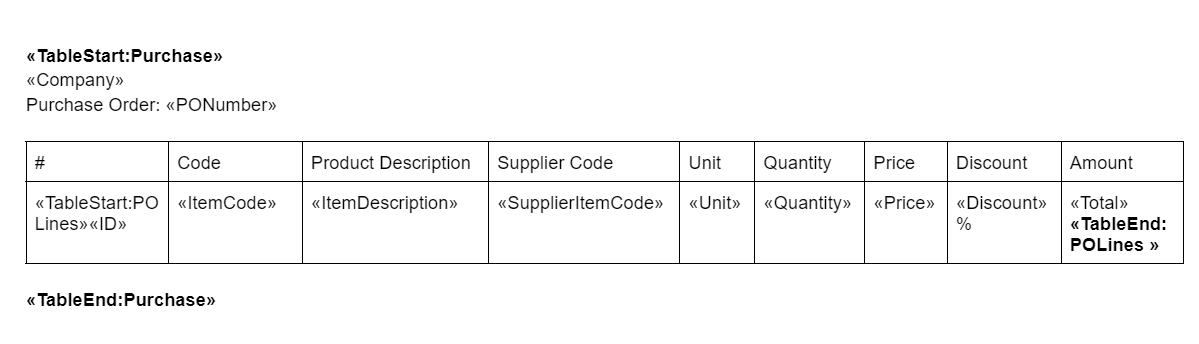
The most important thing to remember when making changes to templates is to change the FIELD CODE, not the FIELD NAME.
Right-click any <<field name>> and click Toggle Field Codes to show the field code (displayed as {MERGEFIELD field code}).
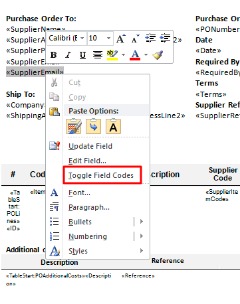
Windows users can toggle all field codes by holding down ALT + F9.
Mac users can toggle all field codes by pressing OPTION + F9.
FIELD NAMES: Don't change these.
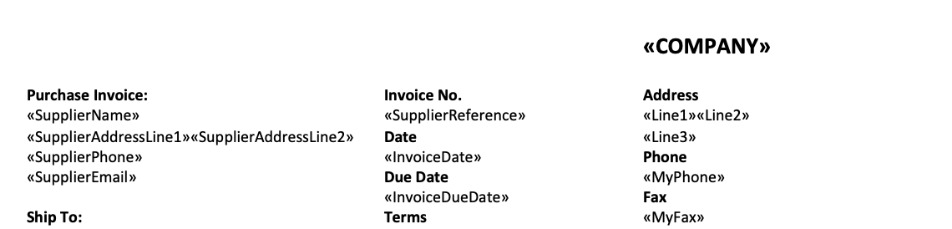
FIELD CODES: Change these.
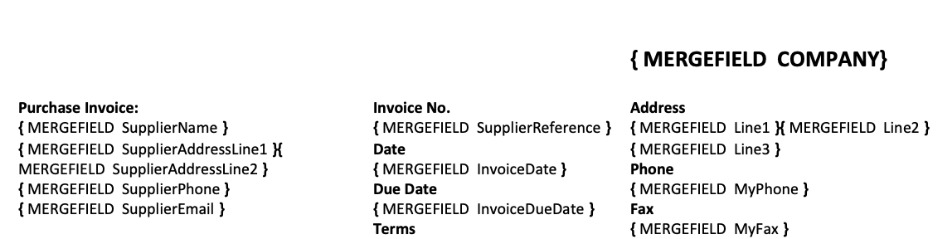
Once you have made your changes to the field code, right-click and click Update Field for the changes to take effect.
Purchase process MailMerge fields
Purchase process MailMerge fields are used in the following template types: Purchase Order, Purchase Order Variation, Purchase Invoice, Receiving Note, Purchase Return, Product Label, Purchase Order Matrix.
Purchase
These field codes can be used between the «TableStart:Purchase» and «TableEnd:Purchase» tags. This is the parent MailMerge table for purchase process templates. Parent fields can be used anywhere between the parent start and end tags.
Purchase field codes can be used in all of the Purchase document templates.
| Field Code | Description |
|---|---|
| TaskID | Unique Purchase task ID |
| Company | Company name |
| Line1 | Company Address Line1 |
| Line2 | Company Address Line2 |
| Line3 | Company Address Line3 |
| OrganizationName | Company name (dropship purchases only) |
| ShipToDifferentCompany | Shipping Company if user choose Different Company |
| ShipToDifferentContact | Shipping Contact if user choose Different Company |
| ShippingAddressLine1 | Company Shipping Address Line1 |
| ShippingAddressLine2 | Company Shipping Address Line2 |
| ShippingLine1 | Shipping Address Line 1 |
| ShippingLine2 | Shipping Address Line 2 |
| ShippingCitySuburb | Shipping Address City/Suburb |
| ShippingStateProvince | Shipping Address State/Province |
| ShippingZipPostCode | Shipping Address Zip/Postcode |
| ShippingCountry | Shipping Address Country |
| VendorLine1 | Vendor Address Line 1 |
| VendorLine2 | Vendor Address Line 2 |
| VendorCitySuburb | Vendor Address City/Suburb |
| VendorStateProvince | Vendor Address State/Province |
| VendorZipPostCode | Vendor Address Zip/Postcode |
| VendorCountry | Vendor Address Country |
| CustomerPhone | For Drop-shipped purchase tasks, this field holds Phone field value from originating sale task (Customer Phone) |
| CustomerReference | For Drop-shipped purchase tasks, this field holds Customer Reference field value from originating sale task |
| MyName | Company Contact Name |
| MyPhone | Company Phone |
| MyFax | Company Fax |
| MyEmail | Company Email |
| MyWebsite | Company Website |
| SupplierName | Supplier Name |
| SupplierFax | Supplier Fax |
| SupplierEmail | Supplier Email |
| SupplierWebsite | Supplier Website |
| SupplierContact | Supplier Contact |
| SupplierPhone | Supplier Phone |
| SupplierCurrency | Supplier Currency |
| TaxNumber | Supplier Tax Number |
| Terms | Payment terms |
| SupplierAddressLine1 | Supplier Billing Address Line1 |
| SupplierAddressLine2 | Supplier Billing Address Line2 |
| SupplierReference | Supplier Reference (e.g. Invoice Number) |
| InvoiceDate | Invoice Date |
| InvoiceDueDate | Invoice Due Date |
| RequiredBy | Shipment Required By |
| Currency | Organization’s Base Currency |
| Rate | Currency conversion rate |
| Tax | Total Tax for document |
| PONumber | Purchase Order Number |
| Date | Date of the document |
| Location | Warehouse Location |
| PurchaseOrderMemo | Purchase Order Memo. Additional information you would like to print on the Purchase Order |
| Note | Internal note from the task header |
| CreditNoteNumber | Credit Note Number |
| CreditNoteDate | Credit Note Date |
| POLinesBeforeTax | Total Lines In Purchase Order Table |
| POLinesTax | Purchase order total Tax |
| POLinesTotal | Purchase order total amount |
| POAdditionalCostLinesBeforeTax | Purchase order Additional Costs Before Tax |
| POAdditionalCostLinesTax | Purchase order Additional Cost Tax |
| POAdditionalCostLinesTotal | Purchase order Additional Cost Total including tax |
| POBeforeTax | Total purchase order lines and additional costs |
| POTax | Total purchase order taxes |
| POTotal | Total purchase order including taxes and additional costs |
| InvoiceLinesBeforeTax | Invoice Lines Before Tax |
| InvoiceLinesTax | Invoice Lines Tax |
| InvoiceLinesTotal | Invoice Lines Total |
| CreditNoteLinesBeforeTax | Credit Note Lines Before Tax |
| CreditNoteLinesTax | Credit Note Lines Tax |
| CreditNoteLinesTotal | Credit Note Lines Total |
| InvoiceAdditionalCostLinesBeforeTax | Invoice Additional Cost Lines Before Tax |
| InvoiceAdditionalCostLinesTax | Invoice Additional Cost Lines Tax |
| InvoiceAdditionalCostLinesTotal | Invoice Additional Cost Lines Total |
| CreditNoteAdditionalCostLinesBeforeTax | Credit Note Additional Cost Lines Before Tax |
| CreditNoteAdditionalCostLinesTax | Credit Note Additional Cost Lines Tax |
| CreditNoteAdditionalCostLinesTotal | Credit Note Additional Cost Lines Total |
| InvoiceLinesAndCostsBeforeTax | Invoice Lines And Costs Before Tax |
| InvoiceLinesAndCostsTaxTotal | Invoice Lines And Costs Tax Total |
| TotalPrepayments | Total of Prepayments |
| InvoiceBalance | Invoice Balance is total costs minus payments |
| CreditNoteBalance | Credit Note Balance |
| TotalCostOfGoods | Total Cost Of Goods |
| TotalPayments | Total Payments |
| TotalRefunds | Total Refunds |
| POTotalDiscount | Total Discount amount on PO |
| InvoiceLinesTotalDiscount | Total Discount amount on Purchase Invoice |
| CreditNoteLinesTotalDiscount | Total Discount amount on PO Return |
| DatePrinted | Date Printed |
| DueOrCredit | Due Or Credit for this invoice. |
| IsServiceOnly | Flag indicating that sale Is Service Only Purchase no inventory involved |
| LinesInAdditionalCost | Total Lines In Additional Cost table |
| LinesInPayment | Total Lines In Payment table |
| LinesInReceived | Total Lines In Received table |
| LinesInPrepayment | Total Lines In Prepayment table |
| LinesInPO | Total Lines In purchase order Table |
| LinesInPOAdditionalCost | Total Lines In purchase order Additional Cost table |
| LinesInInvoice | total Lines In Invoice table |
| LinesInCreditNote | Total Lines In Credit Note table |
| LinesInCreditNoteAdditionalCosts | Total Lines In Credit Note Additional Costs table |
| LinesInRefund | Total Lines In Refund table |
| CreditNoteLinesAndCostTax | Credit Note Lines And Cost Tax |
| CreditNoteLinesAndCostBeforeTax | Credit Note Lines And Cost Before Tax |
| POTotalQuantity | Total purchase order quantities |
| StockReceivedTotalQuantity | Total stock received quantities |
| UnstockTotalQuantity | Total unstock quantities |
| InvoiceTotalQuantity | Total quantities invoiced |
| CreditNoteTotalQuantity | Total quantities on credit note |
| AdditionalAttribute1 | Supplier Additional Attribute 1 |
| AdditionalAttribute2 | Supplier Additional Attribute 2 |
| AdditionalAttribute3 | Supplier Additional Attribute 3 |
| AdditionalAttribute4 | Supplier Additional Attribute 4 |
| AdditionalAttribute5 | Supplier Additional Attribute 5 |
| AdditionalAttribute6 | Supplier Additional Attribute 6 |
| AdditionalAttribute7 | Supplier Additional Attribute 7 |
| AdditionalAttribute8 | Supplier Additional Attribute 8 |
| AdditionalAttribute9 | Supplier Additional Attribute 9 |
| AdditionalAttribute10 | Supplier Additional Attribute 10 |
| Carrier | Supplier Default Carrier |
| PurchaseAttribute1 | Purchase Additional Attribute 1 |
| PurchaseAttribute2 | Purchase Additional Attribute 2 |
| PurchaseAttribute3 | Purchase Additional Attribute 3 |
| PurchaseAttribute4 | Purchase Additional Attribute 4 |
| PurchaseAttribute5 | Purchase Additional Attribute 5 |
| PurchaseAttribute6 | Purchase Additional Attribute 6 |
| PurchaseAttribute7 | Purchase Additional Attribute 7 |
| PurchaseAttribute8 | Purchase Additional Attribute 8 |
| PurchaseAttribute9 | Purchase Additional Attribute 9 |
| PurchaseAttribute10 | Purchase Additional Attribute 10 |
| NumberOfOuterCartons | Total number of outer cartons |
| POTotalVolume | Total volume of cartons for the purchase order |
POLines
These field codes can be used between the «TableStart:POLines» and «TableEnd:POLines» tags. This is a child MailMerge table. Parent MailMerge table (Purchase) fields can be used between child table start and end tags but child MailMerge table fields can only be used between the child table start and end tags.
POLines TableStart tags, TableEnd tags and field codes are used to generate tables where purchase order lines are displayed.
| Field Code | Description |
|---|---|
| TaskID | Unique Purchase task ID |
| ID | Line number |
| ItemCode | SKU |
| ItemDescription | Product name |
| ShortDescription | Product Short Description |
| ProductNote | Product Internal Note |
| Category | Product Category |
| Brand | Product Brand |
| SupplierItemCode | Supplier code |
| SupplierItemName | Supplier name for the product |
| Unit | Unit of measure |
| HSCode | Harmonized System (HS) classification code |
| CountryOfOrigin | Country of manufacture, production, design, or brand origin |
| Comment | Line comment |
| Quantity | Quantity to buy |
| Price | Sell price |
| PriceNumeric | To print Price with decimal points (it need to add field switch to mailmerge field #,##0.0000) |
| Discount | Discount % |
| Tax | Tax if applicable |
| TaxRule | Name of the tax rule applied to this line |
| Total | Total for line item |
| Barcode | Barcode |
| Description | Product description |
| AdditionalAttribute1 | Product Additional Attribute 1 |
| AdditionalAttribute2 | Product Additional Attribute 2 |
| AdditionalAttribute3 | Product Additional Attribute 3 |
| AdditionalAttribute4 | Product Additional Attribute 4 |
| AdditionalAttribute5 | Product Additional Attribute 5 |
| AdditionalAttribute6 | Product Additional Attribute 6 |
| AdditionalAttribute7 | Product Additional Attribute 7 |
| AdditionalAttribute8 | Product Additional Attribute 8 |
| AdditionalAttribute9 | Product Additional Attribute 9 |
| AdditionalAttribute10 | Product Additional Attribute 10 |
| StockLocator | StockLocator. Specifies location of the item in warehouse |
| ProductImage | ProductImage. Use this mail merge to display image «Image:ProductImage» |
| WeightUnits | Weight Unit |
| ItemWeight | Product Weight per 1 quantity |
| TotalLineWeight | ItemWeight * Quantity |
| InnerQuantity | Quantity of product units per inner carton |
| CartonQuantity | Quantity of inner cartons per outer carton |
| NumberOfCartons | Number of outer cartons required for ordered quantity of order line product |
| CartonVolume | Volume of one outer carton of this product |
| LineVolume | Volume of all outer cartons required for ordered quantity of order line product |
| HSCode | HS Code |
| CountryOfOrigin | Country Of Origin |
POLineDetails
These field codes can be used between the «TableStart:POLineDetails» and «TableEnd:POLineDetails» tags.
This is a child MailMerge table. Parent MailMerge table (Purchase) fields can be used between child table start and end tags but child MailMerge table fields can only be used between the child table start and end tags.
POLineDetails TableStart tags, TableEnd tags and field codes are used to generate tables where purchase order lines are displayed as a matrix.
| Field Code | Description |
|---|---|
| TaskID | Unique Purchase task ID |
| ID | Line number |
| ItemCode | SKU (of product or family) |
| ItemDescription | Product/Family name |
| ShortDescription | Product/Family Short Description |
| ProductNote | Product Internal Note |
| Category | Product/Family Category |
| Brand | Product/Family Brand |
| SupplierItemCode | Supplier code (only for products) |
| SupplierItemName | Supplier name for the product (only for products) |
| Unit | Unit of measure (of product or family) |
| HSCode | Harmonized System (HS) classification code |
| CountryOfOrigin | Country of manufacture, production, design, or brand origin |
| Comment | Line comment |
| Quantity | Quantity to buy |
| Price | Sell price |
| Discount | Discount % |
| Tax | Tax if applicable |
| TaxRule | Name of the tax rule applied to this line |
| Total | Total for line item |
| Description | Product/Family description |
| ProductImage | ProductImage. Use this mail merge to display image «Image:ProductImage» |
| OptionsTable | Table with options of family to buy (color-size matrix) |
POAdditionalCosts
These field codes can be used between the «TableStart:POAdditionalCosts» and «TableEnd:POAdditionalCosts» tags.
This is a child MailMerge table. Parent MailMerge table (Purchase) fields can be used between child table start and end tags but child MailMerge table fields can only be used between the child table start and end tags.
POAdditionalCosts TableStart tags, TableEnd tags and field codes are used to generate tables where purchase order additional costs are displayed.
| Field Code | Description |
|---|---|
| TaskID | Unique Purchase task ID |
| ID | Line number |
| SKU | SKU of Service |
| Description | Description of additional charges |
| Reference | Custom line comment |
| Amount | Unit Price |
| Quantity | Quantity |
| Discount | Discount % |
| TaxRule | Tax rule applied |
| Tax | Tax |
| Total | Total for line item |
Prepayments
These field codes can be used between the «TableStart:Prepayments» and «TableEnd:Prepayments» tags.
This is a child MailMerge table. Parent MailMerge table (Purchase) fields can be used between child table start and end tags but child MailMerge table fields can only be used between the child table start and end tags.
Prepayments TableStart tags, TableEnd tags and field codes are used to generate tables where purchase order prepayments are displayed.
| Field Code | Description |
|---|---|
| ID | Line number |
| PaymentMethod | Name of account used for payment |
| Reference | Reference |
| Amount | Amount of prepayment |
| DatePaid | Date when prepayment was made |
StockReceived
These field codes can be used between the «TableStart:StockReceived» and «TableEnd:StockReceived» tags.
This is a child MailMerge table. Parent MailMerge table (Purchase) fields can be used between child table start and end tags but child MailMerge table fields can only be used between the child table start and end tags.
StockReceived TableStart tags, TableEnd tags and field codes are used to generate tables where stock received lines are displayed (ReceivingNote).
| Field Code | Description |
|---|---|
| TaskID | Unique Purchase task ID |
| ID | Line number |
| ItemCode | SKU |
| ItemDescription | Product name |
| ShortDescription | Product Short Description |
| ProductNote | Product Internal Note |
| Category | Product Category |
| Brand | Product Brand |
| SupplierItemCode | Supplier specific SKU |
| Unit | Unit of measure |
| HSCode | Harmonized System (HS) classification code |
| CountryOfOrigin | Country of manufacture, production, design, or brand origin |
| Quantity | Quantity received |
| Location | Location |
| DateReceived | Date item received |
| Received | Flag indicating that item has been received |
| BatchOrSerialNumber | Batch or Serial number |
| Description | Product description |
| Barcode | Barcode |
| AdditionalAttribute1 | Product Additional Attribute 1 |
| AdditionalAttribute2 | Product Additional Attribute 2 |
| AdditionalAttribute3 | Product Additional Attribute 3 |
| AdditionalAttribute4 | Product Additional Attribute 4 |
| AdditionalAttribute5 | Product Additional Attribute 5 |
| AdditionalAttribute6 | Product Additional Attribute 6 |
| AdditionalAttribute7 | Product Additional Attribute 7 |
| AdditionalAttribute8 | Product Additional Attribute 8 |
| AdditionalAttribute9 | Product Additional Attribute 9 |
| AdditionalAttribute10 | Product Additional Attribute 10 |
| StockLocator | Stock Locator. Specifies location of the item in warehouse |
| ExpiryDate | Item expiry date |
| ProductImage | Product Image. Use this mail merge to display image «Image:ProductImage» |
| PriceTier1 | Price tier 1 |
| PriceTier2 | Price tier 2 |
| PriceTier3 | Price tier 3 |
| PriceTier4 | Price tier 4 |
| PriceTier5 | Price tier 5 |
| PriceTier6 | Price tier 6 |
| PriceTier7 | Price tier 7 |
| PriceTier8 | Price tier 8 |
| PriceTier9 | Price tier 9 |
| PriceTier10 | Price tier 10 |
| ItemWeight | Product Weight per 1 quantity |
| TotalLineWeight | ItemWeight * Quantity |
ReceivingNoteByProducts
These field codes can be used between the «TableStart:ReceivingNoteByProducts» and «TableEnd:ReceivingNoteByProducts» tags. This is a child MailMerge table. Parent MailMerge table (Purchase) fields can be used between child table start and end tags but child MailMerge table fields can only be used between the child table start and end tags.
ReceivingNoteByProducts TableStart tags, TableEnd tags and field codes are used to generate tables where stock received lines are displayed (ReceivingNote). It displays information in a different layout to StockReceived codes.
| Field Code | Description |
|---|---|
| TaskID | Unique Purchase task ID |
| ID | Line number |
| ItemCode | SKU |
| ItemDescription | Product name |
| ShortDescription | Product Short Description |
| ProductNote | Product Internal Note |
| Category | Product Category |
| Brand | Product Brand |
| SupplierItemCode | Supplier specific SKU |
| Unit | Unit of measure |
| HSCode | Harmonized System (HS) classification code |
| CountryOfOrigin | Country of manufacture, production, design, or brand origin |
| Quantity | Quantity received |
| Location | Location |
| DateReceived | Date item received |
| Received | Flag indicating that item has been received |
| BatchOrSerialNumber | Batch or Serial number |
| Description | Product description |
| Barcode | Barcode |
| AdditionalAttribute1 | Product Additional Attribute 1 |
| AdditionalAttribute2 | Product Additional Attribute 2 |
| AdditionalAttribute3 | Product Additional Attribute 3 |
| AdditionalAttribute4 | Product Additional Attribute 4 |
| AdditionalAttribute5 | Product Additional Attribute 5 |
| AdditionalAttribute6 | Product Additional Attribute 6 |
| AdditionalAttribute7 | Product Additional Attribute 7 |
| AdditionalAttribute8 | Product Additional Attribute 8 |
| AdditionalAttribute9 | Product Additional Attribute 9 |
| AdditionalAttribute10 | Product Additional Attribute 10 |
| StockLocator | Stock Locator. Specifies location of the item in warehouse |
| ExpiryDate | Item expiry date |
| ProductImage | Product Image. Use this mail merge to display image «Image:ProductImage» |
| PriceTier1 | Price tier 1 |
| PriceTier2 | Price tier 2 |
| PriceTier3 | Price tier 3 |
| PriceTier4 | Price tier 4 |
| PriceTier5 | Price tier 5 |
| PriceTier6 | Price tier 6 |
| PriceTier7 | Price tier 7 |
| PriceTier8 | Price tier 8 |
| PriceTier9 | Price tier 9 |
| PriceTier10 | Price tier 10 |
| ItemWeight | Product Weight per 1 quantity |
| TotalLineWeight | ItemWeight * Quantity |
ProductLabelsBatch
These field codes can be used between the «TableStart:ProductLabelsBatch» and «TableEnd:ProductLabelsBatch» tags. This is a child MailMerge table. Parent MailMerge table (Purchase) fields can be used between child table start and end tags but child MailMerge table fields can only be used between the child table start and end tags.
ProductLabelsBatch TableStart tags, TableEnd tags and field codes are used to generate tables where stock received lines are displayed (ReceivingNote). It displays the same content as in StockReceived except that for each line with X quantity in StockReceived there are X lines in ProductlabelsBatch table.
| Field Code | Description |
|---|---|
| TaskID | Unique Purchase task ID |
| ID | Line number |
| ItemCode | SKU |
| ItemDescription | Product name |
| ShortDescription | Product Short Description |
| ProductNote | Product Internal Note |
| Category | Product Category |
| Brand | Product Brand |
| SupplierItemCode | Supplier specific SKU |
| Unit | Unit of measure |
| Quantity | Quantity received |
| Location | Location |
| DateReceived | Date item received |
| Received | Flag indicating that item has been received |
| BatchOrSerialNumber | Batch or Serial number |
| Description | Product description |
| Barcode | Barcode |
| AdditionalAttribute1 | Product Additional Attribute 1 |
| AdditionalAttribute2 | Product Additional Attribute 2 |
| AdditionalAttribute3 | Product Additional Attribute 3 |
| AdditionalAttribute4 | Product Additional Attribute 4 |
| AdditionalAttribute5 | Product Additional Attribute 5 |
| AdditionalAttribute6 | Product Additional Attribute 6 |
| AdditionalAttribute7 | Product Additional Attribute 7 |
| AdditionalAttribute8 | Product Additional Attribute 8 |
| AdditionalAttribute9 | Product Additional Attribute 9 |
| AdditionalAttribute10 | Product Additional Attribute 10 |
| StockLocator | Stock Locator. Specifies location of the item in warehouse |
| ExpiryDate | Item expiry date |
| ProductImage | Product Image. Use this mail merge to display image «Image:ProductImage» |
| PriceTier1 | Price tier 1 |
| PriceTier2 | Price tier 2 |
| PriceTier3 | Price tier 3 |
| PriceTier4 | Price tier 4 |
| PriceTier5 | Price tier 5 |
| PriceTier6 | Price tier 6 |
| PriceTier7 | Price tier 7 |
| PriceTier8 | Price tier 8 |
| PriceTier9 | Price tier 9 |
| PriceTier10 | Price tier 10 |
| WeightUnits | Weight Unit |
| ItemWeight | Product Weight per 1 quantity |
| TotalLineWeight | ItemWeight * Quantity |
InvoiceLines
These field codes can be used between the «TableStart:InvoiceLines» and «TableEnd:InvoiceLines» tags.
This is a child MailMerge table. Parent MailMerge table (Purchase) fields can be used between child table start and end tags but child MailMerge table fields can only be used between the child table start and end tags.
InvoiceLinesTableStart tags, TableEnd tags and field codes are used to generate tables where purchase invoice lines are displayed.
| Field Code | Description |
|---|---|
| TaskID | Unique Purchase task ID |
| ID | Line number |
| ItemCode | SKU |
| ItemDescription | Product name |
| ShortDescription | Product Short Description |
| ProductNote | Product Internal Note |
| Category | Product Category |
| Brand | Product Brand |
| SupplierItemCode | Supplier specific SKU |
| Unit | Unit of measure |
| HSCode | Harmonized System (HS) classification code |
| CountryOfOrigin | Country of manufacture, production, design, or brand origin |
| Comment | Line comment |
| Quantity | Quantity received |
| Price | Line item price |
| Discount | Discount applied |
| Tax | Tax if applicable |
| TaxRule | Name of the tax rule applied to this line |
| Total | Total for line item |
| Type | ACCPAY |
| Barcode | Barcode |
| Description | Product description |
| AdditionalAttribute1 | Product Additional Attribute 1 |
| AdditionalAttribute2 | Product Additional Attribute 2 |
| AdditionalAttribute3 | Product Additional Attribute 3 |
| AdditionalAttribute4 | Product Additional Attribute 4 |
| AdditionalAttribute5 | Product Additional Attribute 5 |
| AdditionalAttribute6 | Product Additional Attribute 6 |
| AdditionalAttribute7 | Product Additional Attribute 7 |
| AdditionalAttribute8 | Product Additional Attribute 8 |
| AdditionalAttribute9 | Product Additional Attribute 9 |
| AdditionalAttribute10 | Product Additional Attribute 10 |
| StockLocator | Stock Locator. Specifies location of the item in warehouse |
| ProductImage | Product Image. Use this mail merge to display image «Image:ProductImage» |
| BatchorSerialNumbers | Comma-delimited list of all batches or serial numbers for every item included on the invoice |
| ItemWeight | Product Weight per 1 quantity |
| TotalLineWeight | ItemWeight * Quantity |
InvoiceLineDetails
These field codes can be used between the «TableStart:InvoiceLineDetails» and «TableEnd:InvoiceLineDetails» tags. This is a child MailMerge table. Parent MailMerge table (Purchase) fields can be used between child table start and end tags but child MailMerge table fields can only be used between the child table start and end tags.
InvoiceLineDetailsTableStart tags, TableEnd tags and field codes are used to generate tables where purchase invoice lines are displayed as a matrix.
| Field Code | Description |
|---|---|
| TaskID | Unique Purchase task ID |
| ID | Line number |
| ItemCode | SKU (of product or family) |
| ItemDescription | Product/Family name |
| ShortDescription | Product/Family Short Description |
| ProductNote | Product Internal Note |
| Category | Product/Family Category |
| Brand | Product/Family Brand |
| SupplierItemCode | Supplier code (only for products) |
| SupplierItemName | Supplier name for the product (only for products) |
| Unit | Unit of measure (of product or family) |
| HSCode | Harmonized System (HS) classification code |
| CountryOfOrigin | Country of manufacture, production, design, or brand origin |
| Comment | Line comment |
| Quantity | Quantity to buy |
| Price | Sell price |
| Discount | Discount % |
| Tax | Tax if applicable |
| Total | Total for line item |
| Description | Product/Family description |
| ProductImage | ProductImage. Use this mail merge to display image «Image:ProductImage» |
| WeightUnits | Weight Unit |
| ItemWeight | Product Weight per 1 quantity |
| TotalLineWeight | ItemWeight * Quantity |
| OptionsTable | Table with options of family to buy (color-size matrix) |
InvoiceAdditionalCosts
These field codes can be used between the «TableStart:InvoiceAdditionalCosts» and «TableEnd:InvoiceAdditionalCosts» tags. This is a child MailMerge table. Parent MailMerge table (Purchase) fields can be used between child table start and end tags but child MailMerge table fields can only be used between the child table start and end tags.
InvoiceAdditionalCosts TableStart tags, TableEnd tags and field codes are used to generate tables where purchase invoice additional costs lines are displayed.
| Field Code | Description |
|---|---|
| TaskID | Unique Purchase task ID |
| ID | Line number |
| SKU | SKU of Service |
| Description | Description of additional charges |
| Reference | Custom line comment |
| Amount | Unit Price |
| Quantity | Quantity |
| Discount | Discount % |
| Date | Date charges occurred |
| TaxRule | Tax rule applied |
| Tax | Tax |
| Total | Total for line item |
InvoicePayments
These field codes can be used between the «TableStart:InvoicePayments» and «TableEnd:InvoicePayments» tags. This is a child MailMerge table. Parent MailMerge table (Purchase) fields can be used between child table start and end tags but child MailMerge table fields can only be used between the child table start and end tags.
InvoicePaymentsTableStart tags, TableEnd tags and field codes are used to generate tables where payment lines for purchase invoices are displayed.
| Field Code | Description |
|---|---|
| TaskID | Unique Purchase task ID |
| ID | Line number |
| PaymentMethod | Name of account used for payment |
| Reference | Reference like receipt id |
| Amount | Amount of payment |
| DatePaid | Date when payment was made |
CreditNoteLines
These field codes can be used between the «TableStart:CreditNoteLines» and «TableEnd:CreditNoteLines» tags. This is a child MailMerge table. Parent MailMerge table (Purchase) fields can be used between child table start and end tags but child MailMerge table fields can only be used between the child table start and end tags.
CreditNoteLines TableStart tags, TableEnd tags and field codes are used to generate tables where purchase credit note lines are displayed (Purchase Returns).
| Field Code | Description |
|---|---|
| TaskID | Unique Purchase task ID |
| ID | Line Number |
| ItemCode | SKU |
| ItemDescription | Product name |
| ShortDescription | Product Short Description |
| ProductNote | Product Internal Note |
| Category | Product Category |
| Brand | Product Brand |
| SupplierItemCode | Supplier specific SKU |
| Unit | Unit of measure |
| HSCode | Harmonized System (HS) classification code |
| CountryOfOrigin | Country of manufacture, production, design, or brand origin |
| Comment | Line comment |
| Quantity | Quantity on credit note |
| Price | Price |
| Discount | Discount % |
| Tax | Tax for line item |
| TaxRule | Name of the tax rule applied to this line |
| Total | Total for line item |
| Type | ACCPAYCREDIT |
| Barcode | Barcode |
| Description | Product description |
| AdditionalAttribute1 | Product Additional Attribute 1 |
| AdditionalAttribute2 | Product Additional Attribute 2 |
| AdditionalAttribute3 | Product Additional Attribute 3 |
| AdditionalAttribute4 | Product Additional Attribute 4 |
| AdditionalAttribute5 | Product Additional Attribute 5 |
| AdditionalAttribute6 | Product Additional Attribute 6 |
| AdditionalAttribute7 | Product Additional Attribute 7 |
| AdditionalAttribute8 | Product Additional Attribute 8 |
| AdditionalAttribute9 | Product Additional Attribute 9 |
| AdditionalAttribute10 | Product Additional Attribute 10 |
| StockLocator | Stock Locator. Specifies location of the item in warehouse |
| ProductImage | Product Image. Use this mail merge to display image «Image:ProductImage» |
| BatchorSerialNumbers | Comma-delimited list of all batches or serial numbers for every item included on the credit note |
| ItemWeight | Product Weight per 1 quantity |
| TotalLineWeight | ItemWeight * Quantity |
CreditNoteAdditionalCosts
These field codes can be used between the «TableStart:CreditNoteAdditionalCosts» and «TableEnd:CreditNoteAdditionalCosts» tags. This is a child MailMerge table. Parent MailMerge table (Purchase) fields can be used between child table start and end tags but child MailMerge table fields can only be used between the child table start and end tags.
CreditNoteAdditionalCosts TableStart tags, TableEnd tags and field codes are used to generate tables where credit note additional cost lines are displayed.
| Field Code | Description |
|---|---|
| TaskID | Unique Purchase task ID |
| ID | Line number |
| SKU | SKU of Service |
| Description | Description of additional charges |
| Reference | Customer line comment |
| Amount | Unit Price |
| Quantity | Quantity |
| Discount | Discount % |
| Date | Date charges made |
| TaxRule | Tax rule applied |
| Tax | Tax amount |
| Total | Total for line item |
CreditNotePayments
These field codes can be used between the «TableStart:CreditNotePayments» and «TableEnd:CreditNotePayments» tags. This is a child MailMerge table. Parent MailMerge table (Purchase) fields can be used between child table start and end tags but child MailMerge table fields can only be used between the child table start and end tags.
CreditNotePayments TableStart tags, TableEnd tags and field codes are used to generate tables where credit note payment lines are displayed.
| Field Code | Description |
|---|---|
| TaskID | Unique Purchase task ID |
| ID | Line number |
| PaymentMethod | Name of the account payment made from |
| Reference | Reference like receipt id |
| Amount | Amount |
| DatePaid | Date payment made |
Unstock
These field codes can be used between the «TableStart:Unstock» and «TableEnd:Unstock» tags.
This is a child MailMerge table. Parent MailMerge table (Purchase) fields can be used between child table start and end tags but child MailMerge table fields can only be used between the child table start and end tags.
Unstock TableStart tags, TableEnd tags and field codes are used to generate tables where unstock lines are displayed.
| Field Code | Description |
|---|---|
| TaskID | Unique Purchase task ID |
| ID | Line number |
| ItemCode | SKU |
| ItemDescription | Product name |
| ShortDescription | Product Short Description |
| ProductNote | Product Internal Note |
| Category | Product Category |
| Brand | Product Brand |
| SupplierItemCode | Supplier specific SKU |
| Unit | Unit of measure |
| HSCode | Harmonized System (HS) classification code |
| CountryOfOrigin | Country of manufacture, production, design, or brand origin |
| Quantity | Quantity received |
| Location | Location |
| DateReceived | Date item received |
| Unstock | Flag indicating that item has been unstocked |
| BatchOrSerialNumber | Batch or Serial number |
| Description | Product description |
| Barcode | Barcode |
| AdditionalAttribute1 | Product Additional Attribute 1 |
| AdditionalAttribute2 | Product Additional Attribute 2 |
| AdditionalAttribute3 | Product Additional Attribute 3 |
| AdditionalAttribute4 | Product Additional Attribute 4 |
| AdditionalAttribute5 | Product Additional Attribute 5 |
| AdditionalAttribute6 | Product Additional Attribute 6 |
| AdditionalAttribute7 | Product Additional Attribute 7 |
| AdditionalAttribute8 | Product Additional Attribute 8 |
| AdditionalAttribute9 | Product Additional Attribute 9 |
| AdditionalAttribute10 | Product Additional Attribute 10 |
| StockLocator | Stock Locator. Specifies location of the item in warehouse |
| ExpiryDate | Item expiry date |
| ProductImage | Product Image. Use this mail merge to display image «Image:ProductImage» |
| PriceTier1 | Price tier 1 |
| PriceTier2 | Price tier 2 |
| PriceTier3 | Price tier 3 |
| PriceTier4 | Price tier 4 |
| PriceTier5 | Price tier 5 |
| PriceTier6 | Price tier 6 |
| PriceTier7 | Price tier 7 |
| PriceTier8 | Price tier 8 |
| PriceTier9 | Price tier 9 |
| PriceTier10 | Price tier 10 |
| ItemWeight | Product Weight per 1 quantity |
| TotalLineWeight | ItemWeight * Quantity |
OrderTaxDetails
These field codes can be used between the «TableStart:OrderTaxDetails» and «TableEnd:OrderTaxDetails» tags. This is a child MailMerge table. Parent MailMerge table (Purchase) fields can be used between child table start and end tags but child MailMerge table fields can only be used between the child table start and end tags.
OrderTaxDetails TableStart tags, TableEnd tags and field codes are used to generate tables where lines are displayed to show purchase order tax components.
| Field Code | Description |
|---|---|
| Name | Display Name of the tax component |
| Amount | Value of the tax allocated to this component |
| Percent | Tax rate |
InvoiceTaxDetails
These field codes can be used between the «TableStart:InvoiceTaxDetails» and «TableEnd:InvoiceTaxDetails» tags. This is a child MailMerge table. Parent MailMerge table (Purchase) fields can be used between child table start and end tags but child MailMerge table fields can only be used between the child table start and end tags.
InvoiceTaxDetails TableStart tags, TableEnd tags and field codes are used to generate TableStart tags, TableEnd tags and field codes are used to generate tables where lines are displayed to show purchase order tax components.
| Field Code | Description |
|---|---|
| Name | Display Name of the tax component |
| Amount | Value of the tax allocated to this component |
| Percent | Tax rate |
CreditNoteTaxDetails
These field codes can be used between the «TableStart:CreditNoteTaxDetails» and «TableEnd:CreditNoteTaxDetails» tags. This is a child MailMerge table. Parent MailMerge table (Purchase) fields can be used between child table start and end tags but child MailMerge table fields can only be used between the child table start and end tags.
CreditNoteTaxDetails TableStart tags, TableEnd tags and field codes are used to generate tables where lines are displayed to show purchase order tax components.
| Field Code | Description |
|---|---|
| Name | Display Name of the tax component |
| Amount | Value of the tax allocated to this component |
| Percent | Tax rate |