This report shows a summary of purchase orders. This summary view displays purchase orders without product details. Use this report to see order totals, invoice totals and amount due for each supplier order.
Before you start
Data from this report can be exported in Excel, PDF or RTF format.
Input:
| Input | Description |
|---|---|
| Reporting Period | Allows the user to select the reporting period from a list of options or set a custom date range. |
| Currency | Allows the user to select the currency to be used in the report. |
| Layout | Set to the Default layout. Allows selection of saved layouts, if any. |
| Save Layout As | Allows saving a layout for potential future use. |
| Reset Layout | Resets the layout to the default layout or selected saved layout. |
Select Apply Filter to set filter fields for the report and Update to refresh the output with any new changes. See Managing Cin7 Core Reports - Filtering Reports for more detailed information about using filters.
Output:
The following output fields are available for this report. You may have to open the Configure Layout menu to add some of them to your report.
Fields
| Field | Description |
|---|---|
| Supplier | Name of the supplier who received the purchase order |
| PO # | Purchase Order Number the product is ordered by |
| PO Date | Date of the purchase order |
| Invoice Date | Invoice Date of the purchase order |
| Required By | Date when the purchase needs to be delivered |
| Status | Purchase status |
| Year | Year of the purchase order date |
| Quarter | Quarter of the purchase order date |
| Month | Month of the purchase order date |
| Currency | Supplier currency code this purchase is created in |
| Invoice # | Invoice number assigned by the supplier |
| PO Status | Purchase order status |
| Invoice Status | Status of the invoice |
| Supplier Additional Attribute 1-10 | Values of Additional supplier attributes |
Data headers
| Data header | Description |
|---|---|
| Order Total | Total Ordered amount |
| Invoice Total | Total Billed amount. Includes Credit Note if any. |
| Paid Total | Total Paid amount. Includes Credit Note refund if any. |
| Due | Amount not yet paid. Due = Invoice Total - Paid Total. |
Note: If you have added an Additional Attribute set to your purchase process, the attributes will appear as additional report fields.
FAQs
PO-00XXX (advanced purchase) shows a lot under receiving that has actually been received. Please can you help identify why this is happening.
The payments and Stock are not marked as received. If this has been fully received and paid for, kindly click on the PO drop-down and mark as received. 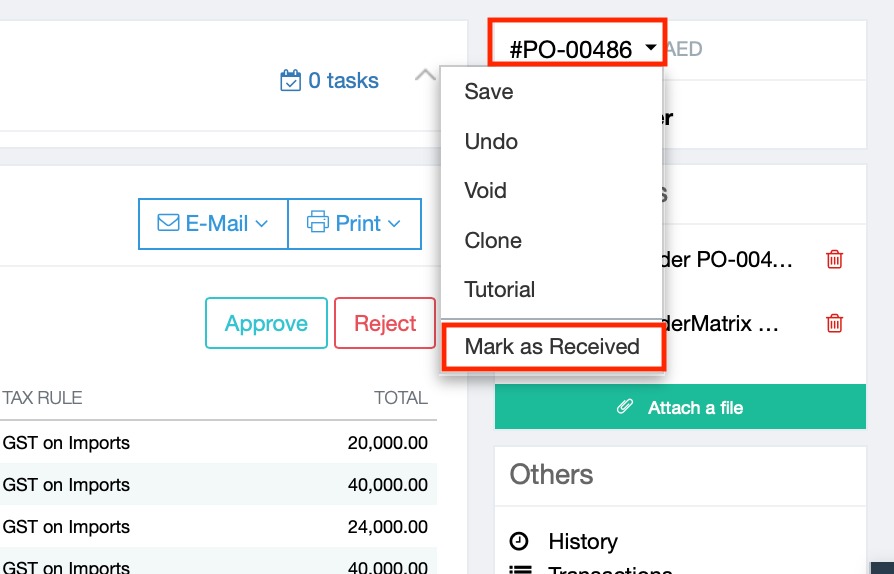
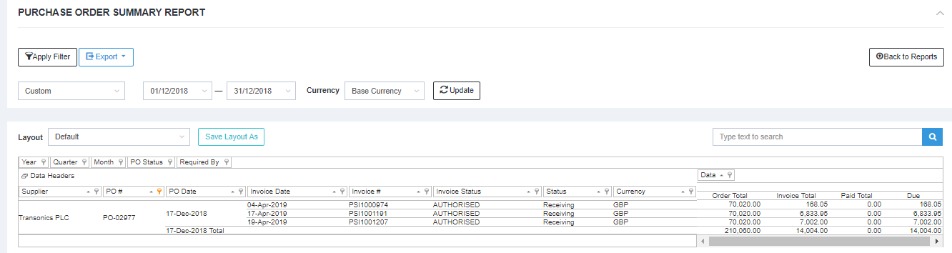
We are having a problem in the Purchase Order Summary where the Order Total reflecting one amount and in the actual Purchase Order is completely different. It repeats the order total to each stock receiving and invoicing, what inflates the total amount.
This is a feature of Advanced Purchases. Advanced purchases are designed to handle purchase orders where multiple invoices and stock deliveries are to be considered part of the same purchase. This results in multiple invoice lines which are attributed to the same purchase order. As shown below, each invoice line will show the order total for the entire PO. This is by design to show Order total in every row if there are multiple invoices.
Still no answer to your question? Please do not hesitate to get in touch with Cin7 Core support.