This article contains all the MailMerge tables for the inventory process. Each table contains MailMerge fields that can be used to edit inventory document templates. Please see Template editing for a video tutorial of the template editing process and familiarize yourself with how to Manage Document and Email Templates before editing your templates. Inventory document templates can be downloaded from Settings → Document and email templates → Inventory.
Note: Cin7 Core have a dedicated support team for resolving template issues, don't hesitate to contact Cin7 Core Support for help.
Before you start
- Manage Document and Email Templates (required) -
Important table structure information
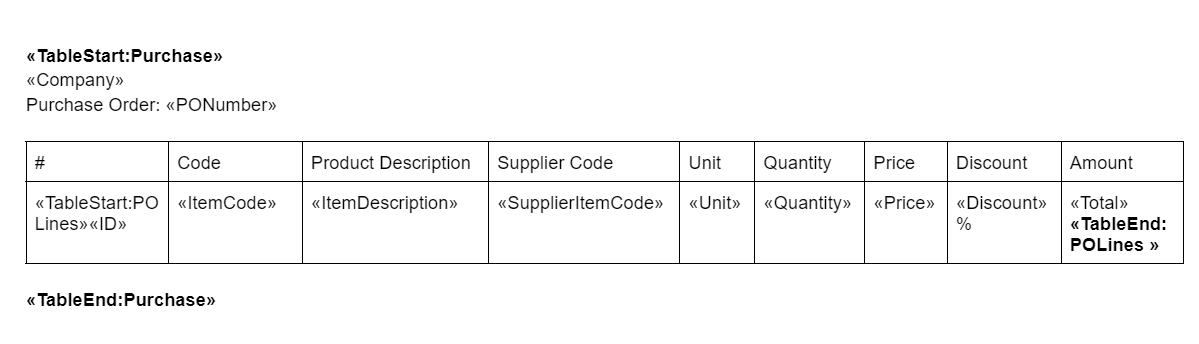
All sections in a template must be contained within TableStart and TableEnd tags. This defines which table the mail merge fields data will be pulled from.
- Templates will start and end with the parent TableStart and TableEnd tags, e.g. «TableStart:Purchase» and«TableEnd:Purchase». Child TableStart and TableEnd tags can be placed within the parent tags.
- Tables that may have multiple lines generated in them, for example, tables with sale order lines, purchase order lines, or additional Charges, will have TableStart and TableEnd tags within the table itself. e.g. «TableStart:POLines» and«TableEnd:POLines». These are child tags that will be found within the parent tags.
- TableStart and TableEnd tags that end in Details (POLineDetails, InvoiceDetails etc.) are for matrix documents, e.g. Purchase Order Matrix, Invoice Matrix.
If you need to customize standard templates, make sure that the opening tag for any table «TableStart:NAME» has the matching closing tag «TableEnd:NAME», or your template will not work. Try to change the structure as little as possible to preserve the template functionality.
Parent table fields can be used in child tables but child table fields can only be used within the child table. In the sample table, Purchase is the parent table and POLines is the child table.
Sample Structure:
The most important thing to remember when making changes to templates is to change the FIELD CODE, not the FIELD NAME.
Right-click any <<field name>> and click Toggle Field Codes to show the field code (displayed as {MERGEFIELD field code}).
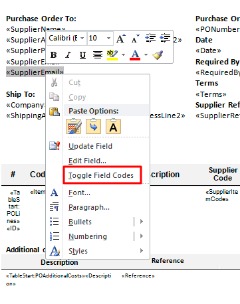
Windows users can toggle all field codes by holding down ALT + F9.
Mac users can toggle all field codes by pressing OPTION + F9.
FIELD NAMES: Don't change these.
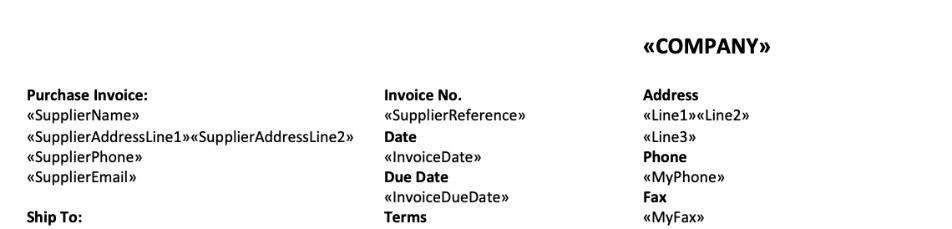
FIELD CODES: Change these.
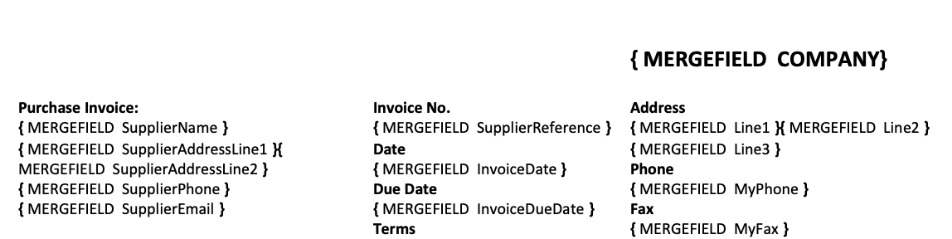
Once you have made your changes to the field code, right-click and click Update Field for the changes to take effect.
Inventory process MailMerge tables
Inventory process MailMerge fields are used in the following template types: Stock Adjustment, Stock Transfer, and Stocktake, and Product Label (Inventory Adjustment and Stocktake).
Note: There is no separate Stocktake MailMerge table. Stocktake templates use the InventoryTask and InventoryAdjustment MailMerge tables.
InventoryTask
These field codes can be used between the «TableStart:InventoryTask» and «TableEnd:InventoryTask» tags. This is the parent MailMerge table for the InventoryAdjustment table. Parent fields can be used anywhere between the parent start and end tags.
InventoryTask field codes can be used in Stocktake and Stock Adjustment templates.
| Field Code | Description |
|---|---|
| Date | Date task created |
| StocktakeNumber | Sequential stocktake number |
| Account | Expense account |
| Status | Status of the task |
| Reference | Document Reference Number |
| Location | Location where stocktake is performed |
| DatePrinted | Current Date |
| Company | Company name |
| PickZone | Product pick zones (only available for Product Label (Inventory Adjustment and Transfer) and Product Specification) |
InventoryAdjustment
These field codes can be used between the «TableStart:InventoryAdjustment» and «TableEnd:InventoryAdjustment» tags. This is a child MailMerge table. Parent MailMerge table (InventoryTask) fields can be used between child table start and end tags but child MailMerge table fields can only be used between the child table start and end tags.
InventoryAdjustment TableStart tags, TableEnd tags and field codes are used to generate tables where stocktake or stock adjustment lines are displayed.
| Field Code | Description |
|---|---|
| ID | Line Number |
| ProductName | Product Name |
| ProductCode | SKU |
| Unit | Unit of measure |
| Location | Warehouse location |
| Barcode | Product barcode |
| WeightPerUnit | Product weight per Unit |
| Comments | Comments |
| QuantityOnHand | Quantity on hand at the time of adjustment created |
| Adjustment | Adjustment quantity |
| Varience | Difference between stock on hand and adjustment |
| BatchOrSerialNumber | Batch or serial number if applicable |
| StockLocator | Stock Locator. Specifies location of the item in warehouse |
| ExpiryDate | Item expiry date |
| Category | Product Category |
| Brand | Brand |
| StockLocator | Stock locator |
| AdditionalAttribute1 | Product additional attribute 1 value |
| AdditionalAttribute2 | Product additional attribute 2 value |
| AdditionalAttribute3 | Product additional attribute 3 value |
| AdditionalAttribute4 | Product additional attribute 4 value |
| AdditionalAttribute5 | Product additional attribute 5 value |
| AdditionalAttribute6 | Product additional attribute 6 value |
| AdditionalAttribute7 | Product additional attribute 7 value |
| AdditionalAttribute8 | Product additional attribute 8 value |
| AdditionalAttribute9 | Product additional attribute 9 value |
| AdditionalAttribute10 | Product additional attribute 10 value |
StockTransferTask
These field codes can be used between the «TableStart:StockTransferTask» and «TableEnd:StockTransferTask» tags. This is the parent MailMerge table for the for the StockTransferDetails and StockTransferOrder template. Parent fields can be used anywhere between the parent start and end tags.
StockTransferTask field codes can be used in stock transfer document templates.
| Field Code | Description |
|---|---|
| Date | Date when transfers was created |
| From | Source Location |
| FromLine1 | Source Location Address Line1 |
| FromLine2 | Source Location Address Line2 |
| FromCitySuburb | Source Location City |
| FromStateProvince | Source Location State/Province |
| FromZipPostCode | Source Location Zip/Post Code |
| FromCountry | Source Location Country |
| To | Target Location |
| ToLine1 | Target Location Address Line1 |
| ToLine2 | Target Location Address Line2 |
| ToCitySuburb | Target Location City |
| ToStateProvince | Target Location State/Province |
| ToZipPostCode | Target Location Zip/Post Code |
| ToCountry | Target Location Country |
| DateReceived | Date Received |
| DateSent | Date Sent |
| InTransitAccount | In Transit Account |
| Status | Status of the transfer task |
| Reference | Document Reference Number |
| Number | Task number |
| User | User who initiated transfer |
| DatePrinted | Date the form is printed |
| Company | Company name |
| RequiredByDate | RequiredByDate for Stock Transfer |
| EffectiveDate | Transfer effective date |
| LinesInDetail | Number of Lines in StockTransferDetail table |
| LinesInOrder | Number of Lines in StockTransferOrder table |
StockTransferDetail
These field codes can be used between the «TableStart:StockTransferDetail» and «TableEnd:StockTransferDetail» tags. This is a child MailMerge table. Parent MailMerge table (StockTransferTask) fields can be used between child table start and end tags but child MailMerge table fields can only be used between the child table start and end tags.
StockTransferDetail TableStart tags, TableEnd tags and field codes are used to generate tables where stock transfer lines are displayed. Lines are pulled from the Products tab of the Stock Transfer.
| Field Code | Description |
|---|---|
| ID | Line Number |
| ProductName | Product name |
| ProductCode | SKU |
| Unit | Unit of measure |
| Location | Location & Bin from which item is picked |
| QuantityOnHand | Quantity on hand |
| QuantityAvailable | Available Quantity |
| TransferQuantity | Transfer Quantity |
| BatchOrSerialNumber | Batch or serial number when applicable |
| StockLocator | Stock Locator. Specifies Default location of the item as specified on the product |
| FromStockLocator | Stock Locator for source warehouse location of the product |
| ToStockLocator | Stock Locator for target warehouse location of the product |
| ExpiryDate | Item expiry date |
| FromLocation | Location where the stock is coming from |
| ToLocation | Location where the stock is going to |
| Barcode | Product barcode |
| WeightPerUnit | Product weight Per Unit |
| Category | Product Category |
| Brand | Product Brand |
| AdditionalAttribute1 | Additional attribute 1 value of the product |
| AdditionalAttribute2 | Additional attribute 2 value of the product |
| AdditionalAttribute3 | Additional attribute 3 value of the product |
| AdditionalAttribute4 | Additional attribute 4 value of the product |
| AdditionalAttribute5 | Additional attribute 5 value of the product |
| AdditionalAttribute6 | Additional attribute 6 value of the product |
| AdditionalAttribute7 | Additional attribute 7 value of the product |
| AdditionalAttribute8 | Additional attribute 8 value of the product |
| AdditionalAttribute9 | Additional attribute 9 value of the product |
| AdditionalAttribute10 | Additional attribute 10 value of the product |
| ProductImage | ProductImage. Use this mail merge to display image «Image:ProductImage» |
StockTransferOrder
These field codes can be used between the «TableStart:StockTransferOrder» and «TableEnd:StockTransferOrder» tags. This is a child MailMerge table. Parent MailMerge table (StockTransferTask) fields can be used between child table start and end tags but child MailMerge table fields can only be used between the child table start and end tags.
StockTransferOrder TableStart tags, TableEnd tags and field codes are used to generate tables where stock transfer lines are displayed. Lines are pulled from the Order tab of the Stock Transfer.
| Field Code | Description |
|---|---|
| ID | Line Number |
| ProductName | Product name |
| ProductCode | SKU |
| Unit | Unit of measure |
| Comments | Comments for line item |
| QuantityOnHand | Quantity on hand |
| QuantityAvailable | Available Quantity |
| TransferQuantity | Transfer Ordered Quantity |
| StockLocator | Stock Locator. Specifies Default location of the item as specified on the product |
| FromStockLocator | Stock Locator for source warehouse location of the product |
| ToStockLocator | Stock Locator for target warehouse location of the product |
| FromLocation | Location where the stock is coming from |
| ToLocation | Location where the stock is going to |
| Barcode | Product barcode |
| WeightPerUnit | Product weight Per Unit |
| Category | Product Category |
| Brand | Product Brand |
| AdditionalAttribute1 | Additional attribute 1 value of the product |
| AdditionalAttribute2 | Additional attribute 2 value of the product |
| AdditionalAttribute3 | Additional attribute 3 value of the product |
| AdditionalAttribute4 | Additional attribute 4 value of the product |
| AdditionalAttribute5 | Additional attribute 5 value of the product |
| AdditionalAttribute6 | Additional attribute 6 value of the product |
| AdditionalAttribute7 | Additional attribute 7 value of the product |
| AdditionalAttribute8 | Additional attribute 8 value of the product |
| AdditionalAttribute9 | Additional attribute 9 value of the product |
| AdditionalAttribute10 | Additional attribute 10 value of the product |
| ProductImage | ProductImage. Use this mail merge to display image «Image:ProductImage» |
InventoryAdjustmentLabel
These field codes can be used between the «TableStart:InventoryAdjustmentLabel» and «TableEnd:InventoryAdjustmentLabel» tags. This is a standalone MailMerge table.
InventoryAdjustmentLabel TableStart tags, TableEnd tags and field codes are used to generate product labels for stock transfers and stock adjustments.
| Field Code | Description |
|---|---|
| Location | Warehouse location |
| Unit | Units of measure |
| Quantity | Quantity |
| ProductCode | SKU |
| Name | Product name |
| Company | Company name |
| DatePrinted | Date report is printed |
| BatchOrSerialNumber | Batch or Serial number if applicable |
| ExpiryDate | Item expiry date |
| Comments | User entered comments |
| StockLocator | Stock Locator. Specifies location of the item in warehouse |
| Barcode | Item Barcode |
| WeightPerUnit | Product weight |
| ProductImage | Product Image. Use this mail merge to display image «Image:ProductImage» |
| Price1 | Price tier 1 |
| Price2 | Price tier 2 |
| Price3 | Price tier 3 |
| Price4 | Price tier 4 |
| Price5 | Price tier 5 |
| Price6 | Price tier 6 |
| Price7 | Price tier 7 |
| Price8 | Price tier 8 |
| Price9 | Price tier 9 |
| Price10 | Price tier 10 |
| Category | Product Category |
| Brand | Product Brand |
| AdditionalAttribute1 | Product additional attribute 1 value |
| AdditionalAttribute2 | Product additional attribute 2 value |
| AdditionalAttribute3 | Product additional attribute 3 value |
| AdditionalAttribute4 | Product additional attribute 4 value |
| AdditionalAttribute5 | Product additional attribute 5 value |
| AdditionalAttribute6 | Product additional attribute 6 value |
| AdditionalAttribute7 | Product additional attribute 7 value |
| AdditionalAttribute8 | Product additional attribute 8 value |
| AdditionalAttribute9 | Product additional attribute 9 value |
| AdditionalAttribute10 | Product additional attribute 10 value |
ProductLabelsBatch
These field codes can be used between the «TableStart:ProductLabelsBatch» and «TableEnd:ProductLabelsBatch» tags. This is a standalone MailMerge table.
ProductLabelsBatch TableStart tags, TableEnd tags and field codes are used to generate product labels for stock transfers and stock adjustments. This able contains the same content as in InventoryAdjustmentLabel except that for each line with X quantity in InventoryAdjustmentLabel there are X lines in ProductLabelsBatch.
| Field Code | Description |
|---|---|
| Location | Warehouse location |
| Unit | Units of measure |
| Quantity | Quantity |
| ProductCode | SKU |
| Name | Product name |
| Company | Company name |
| DatePrinted | Date report is printed |
| BatchOrSerialNumber | Batch or Serial number if applicable |
| ExpiryDate | Item expiry date |
| Comments | User entered comments |
| StockLocator | Stock Locator. Specifies location of the item in warehouse |
| Barcode | Item Barcode |
| WeightPerUnit | Product weight Per Unit |
| Weight | Total weight for Line |
| ProductImage | Product Image. Use this mail merge to display image «Image:ProductImage» |
| Price1 | Price tier 1 |
| Price2 | Price tier 2 |
| Price3 | Price tier 3 |
| Price4 | Price tier 4 |
| Price5 | Price tier 5 |
| Price6 | Price tier 6 |
| Price7 | Price tier 7 |
| Price8 | Price tier 8 |
| Price9 | Price tier 9 |
| Price10 | Price tier 10 |
| Category | Product category |
| Brand | Product Brand |
| AdditionalAttribute1 | Product additional attribute 1 value |
| AdditionalAttribute2 | Product additional attribute 2 value |
| AdditionalAttribute3 | Product additional attribute 3 value |
| AdditionalAttribute4 | Product additional attribute 4 value |
| AdditionalAttribute5 | Product additional attribute 5 value |
| AdditionalAttribute6 | Product additional attribute 6 value |
| AdditionalAttribute7 | Product additional attribute 7 value |
| AdditionalAttribute8 | Product additional attribute 8 value |
| AdditionalAttribute9 | Product additional attribute 9 value |
| AdditionalAttribute10 | Product additional attribute 10 value |
Assembly/Finished Goods MailMerge tables
Assembly/Finished Goods MailMerge fields are used in the following template types: Finished Goods (Assembly Orders), Issue to Production (Inventory Write-off) and Product Labels for finished goods.
FinishedGoodsTask
These field codes can be used between the «TableStart:FinishedGoodsTask» and «TableEnd:FinishedGoodsTask» tags. This is the parent MailMerge table for the FinishedGoodsComponents, FinishedGoodsComponentsBatch and FinishedGoodsOrder table. Parent fields can be used anywhere between the parent start and end tags.
FinishedGoodsTask field codes are used in finished goods, issue to production and finished good product label templates.
| Field Code | Description |
|---|---|
| AssemblyNumber | Assembly Number |
| Status | Status of assembly task |
| LastUpdatedBy | User made the most recent change |
| Location | Warehouse location |
| Quantity | Quantity to assemble |
| ProductCode | SKU |
| Name | Product Name |
| Barcode | Product barcode |
| WeightPerUnit | Product weight Per Unit |
| Weight | Total weight for Line |
| Company | Company name |
| Date | Date assembly was created |
| DatePrinted | Date report is printed |
| WIPDate | Work in Progress date |
| CompletionDate | Completion date |
| Account | Expense Account code / Finished Good account code |
| WIPAccount | WIP Account code |
| Unit | Unit of measure |
| BatchOrSerialNumber | Batch or Serial number if applicable |
| TotalCost | Cost of the finished goods |
| StockLocator | Stock Locator. Specifies location of the item in warehouse |
| ExpiryDate | Item expiry date |
| ProductImage | Product Image. Use this mail merge to display image «Image:ProductImage» |
| Bin | Name of the bin assembled product is placed to. Can be empty. |
| Notes | Multiline notes |
| AdditionalAttribute1 | Additional attribute 1 value of the product |
| AdditionalAttribute2 | Additional attribute 2 value of the product |
| AdditionalAttribute3 | Additional attribute 3 value of the product |
| AdditionalAttribute4 | Additional attribute 4 value of the product |
| AdditionalAttribute5 | Additional attribute 5 value of the product |
| AdditionalAttribute6 | Additional attribute 6 value of the product |
| AdditionalAttribute7 | Additional attribute 7 value of the product |
| AdditionalAttribute8 | Additional attribute 8 value of the product |
| AdditionalAttribute9 | Additional attribute 9 value of the product |
| AdditionalAttribute10 | Additional attribute 10 value of the product |
| Description | Manufactured product description |
FinishedGoodsComponents
These field codes can be used between the «TableStart:FinishedGoodsComponents» and «TableEnd:FinishedGoodsComponents» tags. This is a child MailMerge table. Parent MailMerge table (FinishedGoodsTask) fields can be used between child table start and end tags but child MailMerge table fields can only be used between the child table start and end tags.
FinishedGoodsComponents TableStart tags, TableEnd tags and field codes are used to generate tables where assembly components to be picked are displayed, without batch numbers. Lines are pulled from the Pick tab of an assembly.
| Field Code | Description |
|---|---|
| ID | Line Number |
| TotalQuantity | Total quantity to use in assembly |
| WastageQuantity | Assumed wastage (quantity) |
| WastagePercent | Assumed wastage (percent) |
| ProductCode | SKU |
| Name | Product name |
| ShortDescription | Product Short Description |
| Cost | Cost of 1 quantity |
| Unit | Units of measure |
| BatchOrSerialNumber [X?] | Batch or Serial number if applicable |
| TotalCost | Cost of the component for TotalQuantity |
| Barcode | Product barcode |
| WeightPerUnit | Product weight Per Unit |
| Weight | Total weight for Line |
| StockLocator | Stock Locator. Specifies location of the item in warehouse |
| ExpiryDate | Item expiry date |
| ProductImage | Product Image. Use this mail merge to display image «Image:ProductImage» |
| Bin | Name of the bin finished goods component is taken from. Can be empty. |
| AdditionalAttribute1 | Product additional attribute 1 |
| AdditionalAttribute2 | Product additional attribute 2 |
| AdditionalAttribute3 | Product additional attribute 3 |
| AdditionalAttribute4 | Product additional attribute 4 |
| AdditionalAttribute5 | Product additional attribute 5 |
| AdditionalAttribute6 | Product additional attribute 6 |
| AdditionalAttribute7 | Product additional attribute 7 |
| AdditionalAttribute8 | Product additional attribute 8 |
| AdditionalAttribute9 | Product additional attribute 9 |
| AdditionalAttribute10 | Product additional attribute 10 |
| Category | Product category |
| Brand | Product brand |
| Description | Component product description |
FinishedGoodsComponentsBatch
These field codes can be used between the «TableStart:FinishedGoodsComponentsBatch» and «TableEnd:FinishedGoodsComponentsBatch» tags. This is a child MailMerge table. Parent MailMerge table (FinishedGoodsTask) fields can be used between child table start and end tags but child MailMerge table fields can only be used between the child table start and end tags.
FinishedGoodsComponentsBatch TableStart tags, TableEnd tags and field codes are used to generate tables where assembly components to be picked are displayed, grouped by batch numbers. Lines are pulled from the Pick tab of an assembly.
| Field Code | Description |
|---|---|
| ID | Line Number |
| ProductCode | SKU |
| Name | Product name |
| ShortDescription | Product Short Description |
| Unit | Units of measure |
| BatchOrSerialNumber | Batch or Serial number if applicable |
| StockLocator | Stock Locator. Specifies location of the item in warehouse |
| ExpiryDate | Item expiry date |
| ProductImage | Product Image. Use this mail merge to display image «Image:ProductImage» |
| Barcode | Product barcode |
| WeightPerUnit | Product weight Per Unit |
| Weight | Total weight for Line |
| Bin | Name of the bin finished goods component is taken from. Can be empty. |
| AdditionalAttribute1 | Product additional attribute 1 |
| AdditionalAttribute2 | Product additional attribute 2 |
| AdditionalAttribute3 | Product additional attribute 3 |
| AdditionalAttribute4 | Product additional attribute 4 |
| AdditionalAttribute5 | Product additional attribute 5 |
| AdditionalAttribute6 | Product additional attribute 6 |
| AdditionalAttribute7 | Product additional attribute 7 |
| AdditionalAttribute8 | Product additional attribute 8 |
| AdditionalAttribute9 | Product additional attribute 9 |
| AdditionalAttribute10 | Product additional attribute 10 |
| Category | Product category |
| Brand | Product brand |
| Description | Component product description |
FinishedGoodsOrder
These field codes can be used between the «TableStart:FinishedGoodsOrder» and «TableEnd:FinishedGoodsOrder» tags. This is a child MailMerge table. Parent MailMerge table (FinishedGoodsTask) fields can be used between child table start and end tags but child MailMerge table fields can only be used between the child table start and end tags.
FinishedGoodsOrder TableStart tags, TableEnd tags and field codes are used to generate tables where assembly components are displayed. Lines are pulled from the Order tab of an assembly.
| Field Code | Description |
|---|---|
| ID | Line Number |
| Quantity | Quantity to use |
| TotalQuantity | Quantity to assemble |
| WastageQuantity | Assumed wastage (quantity) |
| WastagePercent | Assumed wastage (percent) |
| ProductCode | SKU |
| Name | Product name |
| ShortDescription | Product Short Description |
| Barcode | Product barcode |
| WeightPerUnit | Product weight Per Unit |
| Weight | Total weight for Line |
| Cost | Cost of 1 quantity of the component |
| Unit | Units of measure |
| TotalCost | Cost of TotalQuantity of the component |
| StockLocator | Stock Locator. Specifies location of the item in warehouse |
| ProductImage | Product Image. Use this mail merge to display image «Image:ProductImage» |
| Category | Product Category |
| Brand | Product Brand |
| AdditionalAttribute1 | Product additional attribute 1 value |
| AdditionalAttribute2 | Product additional attribute 2 value |
| AdditionalAttribute3 | Product additional attribute 3 value |
| AdditionalAttribute4 | Product additional attribute 4 value |
| AdditionalAttribute5 | Product additional attribute 5 value |
| AdditionalAttribute6 | Product additional attribute 6 value |
| AdditionalAttribute7 | Product additional attribute 7 value |
| AdditionalAttribute8 | Product additional attribute 8 value |
| AdditionalAttribute9 | Product additional attribute 9 value |
| AdditionalAttribute10 | Product additional attribute 10 value |
| Description | Product description |
Price list MailMerge tables
Price list MailMerge fields are used in the following template types: Price list, B2B Price list.
Header
These field codes can be used between the «TableStart:Header» and «TableEnd:Header» tags. This is a standalone MailMerge table.
Header TableStart tags, TableEnd tags and field codes are used to fill in the header information for a price list.
| Field Code | Description |
|---|---|
| Company | Company name |
| PriceTierName1 | Name for price tier 1 |
| PriceTierName2 | Name for price tier 2 |
| PriceTierName3 | Name for price tier 3 |
| PriceTierName4 | Name for price tier 4 |
| PriceTierName5 | Name for price tier 5 |
| PriceTierName6 | Name for price tier 6 |
| PriceTierName7 | Name for price tier 7 |
| PriceTierName8 | Name for price tier 8 |
| PriceTierName9 | Name for price tier 9 |
| PriceTierName10 | Name for price tier 10 |
| DatePrinted | Date when price list is generated |
| SelectedCategory | Category selected as a filter |
| SelectedBrand | Brand selected as a filter |
| SelectedTag | Product tag selected as a filter |
Products
These field codes can be used between the «TableStart:Products» and «TableEnd:Products» tags. This is a standalone MailMerge table.
Products TableStart tags, TableEnd tags and field codes are used to generate tables displaying product lines for a price list.
product labels for stock transfers and stock adjustments. This able contains the same content as in InventoryAdjustmentLabel except that for each line with X quantity in InventoryAdjustmentLabel there are X lines in ProductLabelsBatch.
| Field Code | Description |
|---|---|
| ID | Line Number |
| ProductCode | Product code |
| ProductName | Product name |
| ShortDescription | Product Short Description |
| Category | Category |
| Brand | Brand |
| Barcode | Barcode |
| Description | Product description |
| CustomField1 | Value of custom field 1 |
| CustomField2 | Value of custom field 2 |
| CustomField3 | Value of custom field 3 |
| CustomField4 | Value of custom field 4 |
| CustomField5 | Value of custom field 5 |
| CustomField6 | Value of custom field 6 |
| CustomField7 | Value of custom field 7 |
| CustomField8 | Value of custom field 8 |
| CustomField9 | Value of custom field 9 |
| CustomField10 | Value of custom field 10 |
| StockLocator | Stock Locator. Specifies location of the item in warehouse |
| Option1 | Name of the option 1 (For product families only) |
| Option2 | Name of the option 2 (For product families only) |
| Option3 | Name of the option 3 (For product families only) |
| Price1 | Price tier 1 |
| Price2 | Price tier 2 |
| Price3 | Price tier 3 |
| Price4 | Price tier 4 |
| Price5 | Price tier 5 |
| Price6 | Price tier 6 |
| Price7 | Price tier 7 |
| Price8 | Price tier 8 |
| Price9 | Price tier 9 |
| Price10 | Price tier 10 |
| UOM | Unit of measure |
| Tags | Comma delimited product tags |
| Available | Available stock (includes allocated) |
| OnHand | Stock on hand (doesn’t include allocated) |
| ProductImage | Product Image. Use this mail merge to display image «Image:ProductImage» |
Disassembly MailMerge tables
Disassembly MailMerge fields are used in the following template types: Disassembly Details, Disassembly Picking, Disassembly Labels.
Disassembly
These field codes can be used between the «TableStart:Disassembly» and «TableEnd:Disassembly» tags. This is the parent MailMerge table for the DisassemblyPicking, DisassemblyComponents and DisassemblyServices and DisassemblyLabel tables. Parent fields can be used anywhere between the parent start and end tags.
Disassembly field codes are used in disassembly details, picking and label templates.
| Field Code | Description |
|---|---|
| Date | Date when disassembly task was created |
| DisassemblyNumber | Unique number of the disassembly task |
| Status | Status of the task |
| Location | Location where disassembly takes place |
| ProductCode | SKU of disassembled product |
| Name | Name of disassembled product |
| Quantity | Quantity of disassembled product |
| WIPDate | Date when Pick in disassembly was authorized (in case of Undo it keeps original Work in Progress date) |
| CompletionDate | Date when disassembly result was authorized and task status changed to Completed (in case of Undo it keeps original Completion date) |
| DatePrinted | Date when the document is generated |
| Company | Company name |
| AssemblyInstructionURL | URL of the assembly instruction if specified for disassembled product |
| StockLocator | Stock Locator field of disassembled product |
| Barcode | Barcode of disassembled product |
| AdditionalAttribute1 | Additional Attribute 1 of disassembled product |
| AdditionalAttribute2 | Additional Attribute 2 of disassembled product |
| AdditionalAttribute3 | Additional Attribute 3 of disassembled product |
| AdditionalAttribute4 | Additional Attribute 4 of disassembled product |
| AdditionalAttribute5 | Additional Attribute 5 of disassembled product |
| AdditionalAttribute6 | Additional Attribute 6 of disassembled product |
| AdditionalAttribute7 | Additional Attribute 7 of disassembled product |
| AdditionalAttribute8 | Additional Attribute 8 of disassembled product |
| AdditionalAttribute9 | Additional Attribute 9 of disassembled product |
| AdditionalAttribute10 | Additional Attribute 10 of disassembled product |
| ProductImage | Default image of disassembled product. Use this mail merge to display image «Image:ProductImage» |
| ComponentsTotalCost | Total cost of components produced as a result of disassembly (excluding cost of Labor and Overheads) |
| ServicesTotalAmount | Total amount of Labor and Overheads associated with disassembly |
| TotalCost | ComponentsTotalCost + ServicesTotalAmount |
| TotalComponentLines | Number of components produced as a result of disassembly |
| TotalComponentsQuantity | Quantity of components produced as a result of disassembly |
| Unit | Unit of measure |
| TotalServicesLines | Number of services used in disassembly |
DisassemblyPicking
These field codes can be used between the «TableStart:DisassemblyPicking» and «TableEnd:DisassemblyPicking» tags. This is a child MailMerge table. Parent MailMerge table (Disassembly) fields can be used between child table start and end tags but child MailMerge table fields can only be used between the child table start and end tags.
DisassemblyPicking TableStart tags, TableEnd tags and field codes are used to generate tables where disassembly components to be picked are displayed, without batch numbers. Lines are pulled from the Pick tab of a disassembly.
| Field Code | Description |
|---|---|
| Quantity | Quantity to pick |
| UnitCost | Unit cost of this product batch |
| Cost | Quantity * UnitCost |
| BatchSN | Batch/Serial number |
| ExpiryDate | Expiry Date |
| ID | Line Number |
| StockLocator | Stock Locator field of disassembled product |
| Barcode | Barcode of disassembled product |
| AdditionalAttribute1 | Additional Attribute 1 of disassembled product |
| AdditionalAttribute2 | Additional Attribute 2 of disassembled product |
| AdditionalAttribute3 | Additional Attribute 3 of disassembled product |
| AdditionalAttribute4 | Additional Attribute 4 of disassembled product |
| AdditionalAttribute5 | Additional Attribute 5 of disassembled product |
| AdditionalAttribute6 | Additional Attribute 6 of disassembled product |
| AdditionalAttribute7 | Additional Attribute 7 of disassembled product |
| AdditionalAttribute8 | Additional Attribute 8 of disassembled product |
| AdditionalAttribute9 | Additional Attribute 9 of disassembled product |
| AdditionalAttribute10 | Additional Attribute 10 of disassembled product |
| Bin | Name of the bin pick line is located at. Can be empty. |
DisassemblyComponents
These field codes can be used between the «TableStart:DisassemblyComponents» and «TableEnd:DisassemblyComponents» tags. This is a child MailMerge table. Parent MailMerge table (Disassembly) fields can be used between child table start and end tags but child MailMerge table fields can only be used between the child table start and end tags.
DisassemblyComponents TableStart tags, TableEnd tags and field codes are used to generate tables where disassembly components are displayed. Lines are pulled from the Result tab of a disassembly.
| Field Code | Description |
|---|---|
| Quantity | Quantity produced |
| Cost | Cost of the whole number of units (not a unit cost) |
| BatchSN | Batch/Serial number |
| ExpiryDate | Expiry Date |
| ProductCode | SKU of the produced product |
| Name | Name of the produced product |
| Quantity | Quantity of produced product |
| StockLocator | Stock Locator field of produced product |
| Barcode | Barcode of produced product |
| AdditionalAttribute1 | Additional Attribute 1 of produced product |
| AdditionalAttribute2 | Additional Attribute 2 of produced product |
| AdditionalAttribute3 | Additional Attribute 3 of produced product |
| AdditionalAttribute4 | Additional Attribute 4 of produced product |
| AdditionalAttribute5 | Additional Attribute 5 of produced product |
| AdditionalAttribute6 | Additional Attribute 6 of produced product |
| AdditionalAttribute7 | Additional Attribute 7 of produced product |
| AdditionalAttribute8 | Additional Attribute 8 of produced product |
| AdditionalAttribute9 | Additional Attribute 9 of produced product |
| AdditionalAttribute10 | Additional Attribute 10 of produced product |
| PriceTier1 | Price tier 1 of produced product |
| PriceTier2 | Price tier 2 of produced product |
| PriceTier3 | Price tier 3 of produced product |
| PriceTier4 | Price tier 4 of produced product |
| PriceTier5 | Price tier 5 of produced product |
| PriceTier6 | Price tier 6 of produced product |
| PriceTier7 | Price tier 7 of produced product |
| PriceTier8 | Price tier 8 of produced product |
| PriceTier9 | Price tier 9 of produced product |
| PriceTier10 | Price tier 10 of produced product |
| ProductImage | Default image of produced product. Use this mail merge to display image «Image:ProductImage» |
| ID | Line Number |
| Unit | Unit of measure |
| Bin | Name of the bin disassembled component is placed to. Can be empty. |
DisassemblyServices
These field codes can be used between the «TableStart:DisassemblyServices» and «TableEnd:DisassemblyServices» tags. This is a child MailMerge table. Parent MailMerge table (Disassembly) fields can be used between child table start and end tags but child MailMerge table fields can only be used between the child table start and end tags.
DisassemblyServices TableStart tags, TableEnd tags and field codes are used to generate tables where disassembly services are displayed. Lines are pulled from the Result tab of a disassembly.
| Field Code | Description |
|---|---|
| Amount | Amount of money spent on this service. It is distributed between components to calculate unit cost of produced products |
| ProductCode | SKU of the service |
| Name | Name of the service |
| Barcode | Barcode of service |
| AdditionalAttribute1 | Additional Attribute 1 |
| AdditionalAttribute2 | Additional Attribute 2 |
| AdditionalAttribute3 | Additional Attribute 3 |
| AdditionalAttribute4 | Additional Attribute 4 |
| AdditionalAttribute5 | Additional Attribute 5 |
| AdditionalAttribute6 | Additional Attribute 6 |
| AdditionalAttribute7 | Additional Attribute 7 |
| AdditionalAttribute8 | Additional Attribute 8 |
| AdditionalAttribute9 | Additional Attribute 9 |
| AdditionalAttribute10 | Additional Attribute 10 |
| PriceTier1 | Price tier 1 |
| PriceTier2 | Price tier 2 |
| PriceTier3 | Price tier 3 |
| PriceTier4 | Price tier 4 |
| PriceTier5 | Price tier 5 |
| PriceTier6 | Price tier 6 |
| PriceTier7 | Price tier 7 |
| PriceTier8 | Price tier 8 |
| PriceTier9 | Price tier 9 |
| PriceTier10 | Price tier 10 |
| ID | Line Number |
| Comments | User entered comments |
DisassemblyLabel
These field codes can be used between the «TableStart:DisassemblyLabel» and «TableEnd:DisassemblyLabel» tags. This is a standalone MailMerge table.
DisassemblyLabel TableStart tags, TableEnd tags and field codes are used to generate product labels for disassembly items.
| Field Code | Description |
|---|---|
| Location | Location where disassembly takes place |
| Unit | Unit of measure of produced product |
| Quantity | Quantity produced |
| ProductCode | SKU of produced product |
| Name | Name of produced product |
| Company | Company name |
| DatePrinted | Date when the document is generated |
| BatchOrSerialNumber | Batch/Serial number of produced product |
| ExpiryDate | Expiry date of produced product |
| Cost | Cost of produced product |
| StockLocator | Stock Locator field of produced product |
| Barcode | Barcode of produced product |
| AdditionalAttribute1 | Additional Attribute 1 of produced product |
| AdditionalAttribute2 | Additional Attribute 2 of produced product |
| AdditionalAttribute3 | Additional Attribute 3 of produced product |
| AdditionalAttribute4 | Additional Attribute 4 of produced product |
| AdditionalAttribute5 | Additional Attribute 5 of produced product |
| AdditionalAttribute6 | Additional Attribute 6 of produced product |
| AdditionalAttribute7 | Additional Attribute 7 of produced product |
| AdditionalAttribute8 | Additional Attribute 8 of produced product |
| AdditionalAttribute9 | Additional Attribute 9 of produced product |
| AdditionalAttribute10 | Additional Attribute 10 of produced product |
| PriceTier1 | Price tier 1 of produced product |
| PriceTier2 | Price tier 2 of produced product |
| PriceTier3 | Price tier 3 of produced product |
| PriceTier4 | Price tier 4 of produced product |
| PriceTier5 | Price tier 5 of produced product |
| PriceTier6 | Price tier 6 of produced product |
| PriceTier7 | Price tier 7 of produced product |
| PriceTier8 | Price tier 8 of produced product |
| PriceTier9 | Price tier 9 of produced product |
| PriceTier10 | Price tier 10 of produced product |
| ProductImage | Default image of produced product. Use this mail merge to display image «Image:ProductImage» |
| Bin | Name of the bin disassembled component is placed to. Can be empty. |
DisassemblyLabelsBatch
These field codes can be used between the «TableStart:DisassemblyLabelsBatch» and «TableEnd:DisassemblyLabelsBatch» tags. This is a standalone MailMerge table.
DisassemblyLabelsBatch TableStart tags, TableEnd tags and field codes are used to generate product labels for disassembly items. The table contains the same content as DisassemblyLabel except that for each line with X quantity in DisassemblyLabel there are X lines in DisassemblyLabelsBatch.
| Field Code | Description |
|---|---|
| Location | Location where disassembly takes place |
| Unit | Unit of measure of produced product |
| Quantity | Quantity produced |
| ProductCode | SKU of produced product |
| Name | Name of produced product |
| Company | Company name |
| DatePrinted | Date when the document is generated |
| BatchOrSerialNumber | Batch/Serial number of produced product |
| ExpiryDate | Expiry date of produced product |
| Cost | Cost of produced product |
| StockLocator | Stock Locator field of produced product |
| Barcode | Barcode of produced product |
| AdditionalAttribute1 | Additional Attribute 1 of produced product |
| AdditionalAttribute2 | Additional Attribute 2 of produced product |
| AdditionalAttribute3 | Additional Attribute 3 of produced product |
| AdditionalAttribute4 | Additional Attribute 4 of produced product |
| AdditionalAttribute5 | Additional Attribute 5 of produced product |
| AdditionalAttribute6 | Additional Attribute 6 of produced product |
| AdditionalAttribute7 | Additional Attribute 7 of produced product |
| AdditionalAttribute8 | Additional Attribute 8 of produced product |
| AdditionalAttribute9 | Additional Attribute 9 of produced product |
| AdditionalAttribute10 | Additional Attribute 10 of produced product |
| PriceTier1 | Price tier 1 of produced product |
| PriceTier2 | Price tier 2 of produced product |
| PriceTier3 | Price tier 3 of produced product |
| PriceTier4 | Price tier 4 of produced product |
| PriceTier5 | Price tier 5 of produced product |
| PriceTier6 | Price tier 6 of produced product |
| PriceTier7 | Price tier 7 of produced product |
| PriceTier8 | Price tier 8 of produced product |
| PriceTier9 | Price tier 9 of produced product |
| PriceTier10 | Price tier 10 of produced product |
| ProductImage | Default image of produced product. Use this mail merge to display image «Image:ProductImage» |
| Bin | Name of the bin disassembled component is placed to. Can be empty. |
Job Costing MailMerge tables
Job Costing MailMerge fields are used in the following template types: Job Costing Planned Expenses, Job Costing Actual Expenses
Note: Job Planned Expense template only pulls data if an Authorized Assembly Order is added to Job milestone. Once an Assembly task is completed, it will not be able to print as data is pushed to Job Actual expense. Job Actual Expense only pulls data if a Completed Assembly Order is associated with a job milestone.
JobCosting
These field codes can be used between the «TableStart:JobCosting» and «TableEnd:JobCosting» tags. This is the parent MailMerge table for the PlannedManufacturing, PlannedManufacturingComponents and ActualExpenses and ActualExpenseComponents tables. Parent fields can be used anywhere between the parent start and end tags.
JobCosting field codes are used in the job costing planned expenses and job costing actual expenses templates.
| Field Code | Description |
|---|---|
| StartDate | Date when Job started (user-defined) |
| CompletedDate | Date when Job completed (user-defined) |
| JobNumber | Unique Job reference |
| Status | Current Job status |
| Name | Job description |
| AccountCode | Job account code |
| AccountName | Job account name |
| Contact | Job contact name |
| DatePrinted | Date when the document is generated |
| Company | Company name |
| Comments | Comments of a job |
| AddressLine1 | Job address line 1 |
| AddressLine2 | Job address line 2 |
| EstimatedValue | Estimated job value |
| BudgetedMargin | Default margin that is applied to new sale invoices generated by a job |
| AdditionalAttribute1 | Additional Attribute 1 of a job |
| AdditionalAttribute2 | Additional Attribute 2 of a job |
| AdditionalAttribute3 | Additional Attribute 3 of a job |
| AdditionalAttribute4 | Additional Attribute 4 of a job |
| AdditionalAttribute5 | Additional Attribute 5 of a job |
| AdditionalAttribute6 | Additional Attribute 6 of a job |
| AdditionalAttribute7 | Additional Attribute 7 of a job |
| AdditionalAttribute8 | Additional Attribute 8 of a job |
| AdditionalAttribute9 | Additional Attribute 9 of a job |
| AdditionalAttribute10 | Additional Attribute 10 of a job |
| ProjectManager | Name of project manager who is responsible for a job |
| Phone | Job contact’s phone number |
| Customer | Name of a Customer job is being associated with |
PlannedManufacturing
These field codes can be used between the «TableStart:PlannedManufacturing» and «TableEnd:PlannedManufacturing» tags. This is a parent table for the PlannedManufacturingComponent table and a child table for the JobCosting table. Parent MailMerge table fields can be used between child table start and end tags but child MailMerge table fields can only be used between the child table start and end tags.
PlannedManufacturing TableStart tags, TableEnd tags and field codes are used to generate tables of details for authorized assembly orders for a job milestone. Once an Assembly task is completed, it will not be able to print as data is pushed to Job Actual expense.
| Field Code | Description |
|---|---|
| AssemblyNumber | Unique identifier of Finished Goods task with Authorized status |
| ItemDescription | Name of a product being produced |
| SKU | SKU of a product being produced |
| Quantity | Quantity of a product being produced |
| Cost | Estimated cost of a product being produced |
| Barcode | Barcode of a product being produced |
| AdditionalAttribute1 | Additional Attribute 1 of a product being produced |
| AdditionalAttribute2 | Additional Attribute 2 of a product being produced |
| AdditionalAttribute3 | Additional Attribute 3 of a product being produced |
| AdditionalAttribute4 | Additional Attribute 4 of a product being produced |
| AdditionalAttribute5 | Additional Attribute 5 of a product being produced |
| AdditionalAttribute6 | Additional Attribute 6 of a product being produced |
| AdditionalAttribute7 | Additional Attribute 7 of a product being produced |
| AdditionalAttribute8 | Additional Attribute 8 of a product being produced |
| AdditionalAttribute9 | Additional Attribute 9 of a product being produced |
| AdditionalAttribute10 | Additional Attribute 10 of a product being produced |
| Date | Date when finished goods task was created |
| Unit | Unit of measure of a product being produced |
| ID | Sequential finished goods task number in the list (from 1 onwards) |
PlannedManufacturingComponents
These field codes can be used between the «TableStart:PlannedManufacturingComponents» and «TableEnd:PlannedManufacturingComponents» tags. This is a child MailMerge table. Parent MailMerge tables (PlannedManufacturing and JobCosting) fields can be used between child table start and end tags but child MailMerge table fields can only be used between the child table start and end tags.
PlannedManufacturingComponents TableStart tags, TableEnd tags and field codes are used to generate tables of components for authorized assembly orders for a job milestone. Once an Assembly task is completed, it will not be able to print as data is pushed to Job Actual expense.
| Field Code | Description |
|---|---|
| ItemDescription | Name of component used to produce finished goods product |
| SKU | SKU of component used to produce finished goods product |
| Quantity | Quantity of component used to produce finished goods product |
| Cost | Average Cost/Service cost of component used to produce finished goods product |
| Barcode | Barcode of component used to produce finished goods product |
| AdditionalAttribute1 | Additional Attribute 1of component used to produce finished goods product |
| AdditionalAttribute2 | Additional Attribute 2 of component used to produce finished goods product |
| AdditionalAttribute3 | Additional Attribute 3 of component used to produce finished goods product |
| AdditionalAttribute4 | Additional Attribute 4 of component used to produce finished goods product |
| AdditionalAttribute5 | Additional Attribute 5 of component used to produce finished goods product |
| AdditionalAttribute6 | Additional Attribute 6 of component used to produce finished goods product |
| AdditionalAttribute7 | Additional Attribute 7 of component used to produce finished goods product |
| AdditionalAttribute8 | Additional Attribute 8 of component used to produce finished goods product |
| AdditionalAttribute9 | Additional Attribute 9 of component used to produce finished goods product |
| AdditionalAttribute10 | Additional Attribute 10 of component used to produce finished goods product |
| Unit | Unit of measure of component used to produce finished goods product |
| ID | Sequential product component number in the list (from 1 onwards) |
ActualExpenses
These field codes can be used between the «TableStart:ActualExpenses» and «TableEnd:ActualExpenses» tags. This is a parent table for the ActualExpenseComponent table and a child table for the JobCosting table. Parent MailMerge table fields can be used between child table start and end tags but child MailMerge table fields can only be used between the child table start and end tags.
ActualExpenses TableStart tags, TableEnd tags and field codes are used to generate tables for completed assembly orders for a job milestone.
| Field Code | Description |
|---|---|
| TaskNumber | Unique identifier of Expense task associated with the job |
| ItemDescription | Name of a product being produced (only for finished goods tasks) |
| SKU | SKU of a product being produced (only for finished goods tasks) |
| Quantity | Quantity of a products in expense task |
| ExpenseAmount | Actual total amount of Expense task associated with the job |
| Barcode | Barcode of a product produced (only for finished goods tasks) |
| AdditionalAttribute1 | Additional Attribute 1 of a product produced (only for finished goods tasks) |
| AdditionalAttribute2 | Additional Attribute 2 of a product produced (only for finished goods tasks) |
| AdditionalAttribute3 | Additional Attribute 3 of a product produced (only for finished goods tasks) |
| AdditionalAttribute4 | Additional Attribute 4 of a product produced (only for finished goods tasks) |
| AdditionalAttribute5 | Additional Attribute 5 of a product produced (only for finished goods tasks) |
| AdditionalAttribute6 | Additional Attribute 6 of a product produced (only for finished goods tasks) |
| AdditionalAttribute7 | Additional Attribute 7 of a product produced (only for finished goods tasks) |
| AdditionalAttribute8 | Additional Attribute 8 of a product produced (only for finished goods tasks) |
| AdditionalAttribute9 | Additional Attribute 9 of a product produced (only for finished goods tasks) |
| AdditionalAttribute10 | Additional Attribute 10 of a product produced (only for finished goods tasks) |
| Date | Date when finished goods task/Issue to production task was created or Invoice date of purchase task |
| Unit | Unit of measure of a product produced (only for finished goods tasks) |
| ID | Sequential expense task number in the list (from 1 onwards) |
ActualExpenseComponents
These field codes can be used between the «TableStart:ActualExpenseComponents» and «TableEnd:ActualExpenseComponents» tags. This is a child MailMerge table. Parent MailMerge tables (ActualExpenses and JobCosting) fields can be used between child table start and end tags but child MailMerge table fields can only be used between the child table start and end tags.
ActualExpenseComponents TableStart tags, TableEnd tags and field codes are used to generate tables of expense components from completed assembly orders for a job milestone.
| Field Code | Description |
|---|---|
| ItemDescription | Name of product in Expense task / component used to produce finished goods product |
| SKU | SKU of product in Expense task / component used to produce finished goods product |
| TotalQuantity | Total Quantity of product in Expense task / component used to produce finished goods product |
| ExpenseAmount | Actual expense associated with product in Expense task / component used to produce finished goods product |
| Barcode | Barcode of product in Expense task / component used to produce finished goods product |
| AdditionalAttribute1 | Additional Attribute 1of product in Expense task / component used to produce finished goods product |
| AdditionalAttribute2 | Additional Attribute 2 of product in Expense task / component used to produce finished goods product |
| AdditionalAttribute3 | Additional Attribute 3 of product in Expense task / component used to produce finished goods product |
| AdditionalAttribute4 | Additional Attribute 4 of product in Expense task / component used to produce finished goods product |
| AdditionalAttribute5 | Additional Attribute 5 of product in Expense task / component used to produce finished goods product |
| AdditionalAttribute6 | Additional Attribute 6 of product in Expense task / component used to produce finished goods product |
| AdditionalAttribute7 | Additional Attribute 7 of product in Expense task / component used to produce finished goods product |
| AdditionalAttribute8 | Additional Attribute 8 of product in Expense task / component used to produce finished goods product |
| AdditionalAttribute9 | Additional Attribute 9 of product in Expense task / component used to produce finished goods product |
| AdditionalAttribute10 | Additional Attribute 10 of product in Expense task / component used to produce finished goods product |
| Unit | Unit of measure of product in Expense task / component used to produce finished goods product |
| ID | Sequential product number in the list (from 1 onwards) |
Product Specification MailMerge tables
Product Specification MailMerge fields are used in the following template types: Product Specification, Lot Recall.
Product
These field codes can be used between the «TableStart:Product» and «TableEnd:Product» tags. This is the parent MailMerge table for the BOMComponents, BOMServices and Suppliers table. Parent fields can be used anywhere between the parent start and end tags.
Product field codes can be used in the Product Specification and Lot Recall templates.
| Field Code | Description |
|---|---|
| ProductCode | Product SKU |
| Name | Product name |
| ShortDescription | Product Short Description |
| Category | Product category |
| Type | “Stock” or “Service” |
| Company | Company name |
| DatePrinted | Date when the document is generated |
| CostingMethod | Product costing method |
| Length | Product length dimension value |
| Width | Product width dimension value |
| Height | Product height dimension value |
| DimensionUnits | Dimension Unit of measure |
| Weight | Product weight |
| UnitofMeasure | Product unit of measure |
| Barcode | Product Barcode value |
| MinimumBeforeReorder | Product stock level below which Reorder function becomes active for this product |
| ReorderQuantity | Quantity of the product to reorder when it’s available quantity falls below Minimum Before Reorder level. If 0 is specified then Product is not included in reorder. Has no effect on Reorder Backordered stock function |
| DefaultLocation | Product location by default |
| PriceTier1Name | Name of Price tier 1 as defined in general settings |
| PriceTier2Name | Name of Price tier 2 as defined in general settings |
| PriceTier3Name | Name of Price tier 3 as defined in general settings |
| PriceTier4Name | Name of Price tier 4 as defined in general settings |
| PriceTier5Name | Name of Price tier 5 as defined in general settings |
| PriceTier6Name | Name of Price tier 6 as defined in general settings |
| PriceTier7Name | Name of Price tier 7 as defined in general settings |
| PriceTier8Name | Name of Price tier 8 as defined in general settings |
| PriceTier9Name | Name of Price tier 9 as defined in general settings |
| PriceTier10Name | Name of Price tier 10 as defined in general settings |
| Price1 | Product Tier 1 Price. Will be 0 if no access to Prices information is granted for current user on Product page. |
| Price2 | Product Tier 2 Price. Will be 0 if no access to Prices information is granted for current user on Product page. |
| Price3 | Product Tier 3 Price. Will be 0 if no access to Prices information is granted for current user on Product page. |
| Price4 | Product Tier 4 Price. Will be 0 if no access to Prices information is granted for current user on Product page. |
| Price5 | Product Tier 5 Price. Will be 0 if no access to Prices information is granted for current user on Product page. |
| Price6 | Product Tier 6 Price. Will be 0 if no access to Prices information is granted for current user on Product page. |
| Price7 | Product Tier 7 Price. Will be 0 if no access to Prices information is granted for current user on Product page. |
| Price8 | Product Tier 8 Price. Will be 0 if no access to Prices information is granted for current user on Product page. |
| Price9 | Product Tier 9 Price. Will be 0 if no access to Prices information is granted for current user on Product page. |
| Price10 | Product Tier 10 Price. Will be 0 if no access to Prices information is granted for current user on Product page. |
| HasBOM | “Yes” if product has Bill of Materials, otherwise “No” |
| AverageCost | Product average cost |
| FamilyName | Product family name |
| Description | Product Description (multiline) |
| AttributeSet | Name of the product additional attribute set |
| AdditionalAttribute1Name | Name of the attribute 1 of the attribute set assigned to product |
| AdditionalAttribute2Name | Name of the attribute 2 of the attribute set assigned to product |
| AdditionalAttribute3Name | Name of the attribute 3 of the attribute set assigned to product |
| AdditionalAttribute4Name | Name of the attribute 4 of the attribute set assigned to product |
| AdditionalAttribute5Name | Name of the attribute 5 of the attribute set assigned to product |
| AdditionalAttribute6Name | Name of the attribute 6 of the attribute set assigned to product |
| AdditionalAttribute7Name | Name of the attribute 7 of the attribute set assigned to product |
| AdditionalAttribute8Name | Name of the attribute 8 of the attribute set assigned to product |
| AdditionalAttribute9Name | Name of the attribute 9 of the attribute set assigned to product |
| AdditionalAttribute10Name | Name of the attribute 10 of the attribute set assigned to product |
| AdditionalAttribute1 | Value of the product additional attribute 1 |
| AdditionalAttribute2 | Value of the product additional attribute 2 |
| AdditionalAttribute3 | Value of the product additional attribute 3 |
| AdditionalAttribute4 | Value of the product additional attribute 4 |
| AdditionalAttribute5 | Value of the product additional attribute 5 |
| AdditionalAttribute6 | Value of the product additional attribute 6 |
| AdditionalAttribute7 | Value of the product additional attribute 7 |
| AdditionalAttribute8 | Value of the product additional attribute 8 |
| AdditionalAttribute9 | Value of the product additional attribute 9 |
| AdditionalAttribute10 | Value of the product additional attribute 10 |
| DiscountRule | Product Discount rule name. “No Discount” if no rule is assigned |
| Status | “Active” or “Deprecated” |
| Tags | Product Tags |
| FamilyOption1Value | Product family option 1 value. Only filled in when Product is part of the family |
| FamilyOption2Value | Product family option 2 value. Only filled in when Product is part of the family |
| FamilyOption3Value | Product family option 3 value. Only filled in when Product is part of the family |
| QuantityToProduce | Specified number of units of the product that will be manufactured when specified quantities in BOM are used |
| StockLocator | Product stock locator |
| KitAutoAssembly | Kit / Auto-assembly option. “Yes” or “No”. |
| COGSAccount | [Account Code]: [Account Name] for COGS account if selected for the product. Only for Stock type |
| RevenueAccount | [Account Code]: [Account Name] for Revenue account if selected for the product |
| ExpenseAccount | [Account Code]: [Account Name] for Expense account if selected for the product. Only for Service type. |
| InventoryAccount | [Account Code]: [Account Name] for Inventory account if selected for the product. Only for Stock type |
| DropShipMode | Product Drop Ship mode. “No Drop Ship”, “Optional Drop Ship” or “Always Drop Ship” |
| PurchaseTax | Tax Rule used when purchasing the product |
| SaleTax | Tax Rule used when selling the product |
| AutoDisassembly | Auto-disassembly option. “Yes” or “No” |
| Image:ProductImage | Default product image. Assumes size of its container table cell |
| BOMComponentsCount | Number of lines in BOMComponents child table |
| BOMComponentsAverageCostTotal | Summary of AverageCostTotal field in BOMComponents child table |
| BOMComponentsFixedPriceTotal | Summary of FixedPriceTotal field in BOMComponents child table |
| BOMComponentsLatestPriceTotal | Summary of LatestPriceTotal field in BOMComponents child table |
| BOMServicesCount | Number of lines in BOMServices child table |
| BOMServicesTotal | Summary of Cost field in BOMServices child table |
| SuppliersCount | Number of lines in Suppliers child table |
| BOMAverageCostTotal | BOMComponentsAverageCostTotal + BOMServicesTotal |
| BOMFixedPriceTotal | BOMComponentsFixedPriceTotal + BOMServicesTotal |
| BOMLatestPriceTotal | BOMComponentsLatestPriceTotal + BOMServicesTotal |
| PickZone | Product pick zones (only available for Product Label (Inventory Adjustment and Transfer) and Product Specification) |
BOMComponents
These field codes can be used between the «TableStart:BOMComponents» and «TableEnd:BOMComponents» tags. This is a child MailMerge table. Parent MailMerge table (Product) fields can be used between child table start and end tags but child MailMerge table fields can only be used between the child table start and end tags.
BOMComponents TableStart tags, TableEnd tags and field codes are used to generate tables where component items in a product's BOM are displayed.
| Field Code | Description |
|---|---|
| ProductCode | BOM component SKU |
| Name | BOM component name |
| SKU | SKU of a product being produced |
| Quantity | Quantity of a BOM component required to produce QuantityToProduce units of product |
| WastagePercent | Wastage percent of a BOM component |
| WastageQuantity | Quantity of a BOM component going to waste when producing QuantityToProduce units of product |
| CostPercentage | Percentage of the cost this BOM component received when disassembling product |
| AverageCostPerUnit | BOM component average cost |
| AverageCostTotal | Total Cost of this BOM line including wastage calculated using Average Cost |
| Barcode | BOM component barcode |
| Image:ProductImage | BOM component default image. Assumes size of its container table cell |
| LatestPurchasePricePerUnit | Latest purchase price of BOM Component |
| LatestPurchasePriceTotal | Total Cost of this BOM line including wastage calculated using Latest Purchase Price |
| FixedPurchasePricePerUnit | Fixed purchase price of BOM Component |
| FixedPurchasePriceTotal | Total Cost of this BOM line including wastage calculated using Fixed Purchase Price |
| HasBOM | “Yes” if BOM component has Bill of Materials, otherwise “No” |
| StockLocator | BOM Component stock locator |
| UnitOfMeasure | Unit of measure of BOM component. Quantity is expressed in these units |
| ID | Sequential finished goods task number in the list (from 1 onwards) |
BOMServices - Labor and Overheads
These field codes can be used between the «TableStart:BOMServices» and «TableEnd:BOMServices» tags. This is a child MailMerge table. Parent MailMerge table (Product) fields can be used between child table start and end tags but child MailMerge table fields can only be used between the child table start and end tags.
BOMServices TableStart tags, TableEnd tags and field codes are used to generate tables where service items in a product's BOM are displayed.
| Field Code | Description |
|---|---|
| ProductCode | BOM component SKU |
| Name | BOM component name |
| Quantity | Quantity of service units used to produce finished goods product |
| ExpenseAccount | Expense account code + Expense account name used to allocate Labor & Overheads expenses associated with Manufacturing |
| Cost | Total line cost |
| UnitOfMeasure | Unit of measure of the service. Quantity is expressed in these units |
Suppliers
These field codes can be used between the «TableStart:Suppliers» and «TableEnd:Suppliers» tags. This is a child MailMerge table. Parent MailMerge table (Product) fields can be used between child table start and end tags but child MailMerge table fields can only be used between the child table start and end tags.
Suppliers TableStart tags, TableEnd tags and field codes are used to generate tables where suppliers for a product are displayed.
| Field Code | Description |
|---|---|
| SupplierName | Name of the supplier |
| LatestPurchasePrice | Latest price the product was purchased with from this supplier |
| FixedPurchasePrice | Fixed purchase price set for this product by the supplier |
| SupplierSKU | Supplier product SKU |
| SupplierProductName | Supplier product name |
| URL | This product’s webpage on supplier’s site |
| DropShipSupplier | “Yes” if this supplier is marked as Drop Ship supplier, “No” otherwise |
ProductionBoms
These field codes can be used between the «TableStart:ProductionBoms» and «TableEnd:ProductionBoms» tags. This is a child MailMerge table. Parent MailMerge table (Product) fields can be used between child table start and end tags but child MailMerge table fields can only be used between the child table start and end tags.
ProductionBoms TableStart tags, TableEnd tags and field codes are used to display production BOM details within the Product Specification template.
| Field Code | Description |
|---|---|
| VersionName | Name of the production BOM version. |
| VersionNumber | Production BOM version number. |
| OutputQuantity | Output quantity for the primary product of the production BOM. |
| BufferPercent | Manufacturing buffer percentage added to the total production time. |
| IgnoreCumulativeLeadTime | Whether cumulative lead time is ignored or added to the production lead time. If no, the lead time for component replenishment is calculated from the values set on the Suppliers tab of the Product page. If yes, the lead time is ComponentProductionLeadTime. |
| ComponentProductionLeadTime | Lead time for components if IgnoreCumulativeLeadTime is checked. |
| DeliveryToLocation | Delivery To location of finished product output. |
| CostAllocationType | How costs are allocated when a production BOM contains more than one finished product - Net Realized Value or Sales Value. |
| ProductionBomTotalCost | Total cost of the production BOM components and resources for the BOM quantity. |
ProductionBomOperations
These field codes can be used between the «TableStart:ProductionBomOperations» and «TableEnd:ProductionBomOperations» tags. This is a child MailMerge table. Parent MailMerge table (ProductionBoms) fields can be used between child table start and end tags but child MailMerge table fields can only be used between the child table start and end tags.
ProductionBomOperations TableStart tags, TableEnd tags and field codes are used to generate tables where production BOM operations for a product are displayed within the Product Specification template.
| Field Code | Description |
|---|---|
| Sequence | Sequence number of the operation. |
| PreviousStep | Previous operation name and sequence number. |
| OperationType | Type of operation (Setup, Manufacturing, Quality Control, Co-manufacturing) |
| OperationName | Name of the operation. |
| CycleTime | Operation cycle time. |
| UnitsPerCycle | Units produced per cycle. |
| WorkCenterName | Work center where operation takes place. |
| TotalCost | Total cost of the completed operation. |
ProductionBomOperationComponent
These field codes can be used between the «TableStart:ProductionBomOperationComponents» and «TableEnd:ProductionBomOperationComponents» tags. This is a child MailMerge table. Parent MailMerge table (ProductionBomOperations) fields can be used between child table start and end tags but child MailMerge table fields can only be used between the child table start and end tags.
ProductionBomOperationComponent TableStart tags, TableEnd tags and field codes are used to generate tables where components for production BOM operations are displayed within the Product Specification template.
| Field Code | Description |
|---|---|
| ProductName | Component SKU and name. |
| Quantity | Component quantity for this operation. |
| Unit | Component unit of measure. |
| WastagePercent | Component wastage as a percentage. |
| WastageQuantity | Component wastage as a quantity of the unit of measure. |
| CostPerUnit | Average cost of unit of component. |
| TotalCost | Average cost of total units of components used in the operation. |
ProductionBomOperationResources
These field codes can be used between the «TableStart:ProductionBomOperationResources» and «TableEnd:ProductionBomOperationResources» tags. This is a child MailMerge table. Parent MailMerge table (ProductionBomOperations) fields can be used between child table start and end tags but child MailMerge table fields can only be used between the child table start and end tags.
ProductionBomOperationResources TableStart tags, TableEnd tags and field codes are used to generate tables where resources for production BOM operations are displayed within the Product Specification template.
| Field Code | Description |
|---|---|
| ResourceName | Resource SKU and name. |
| Quantity | Resource quantity for this operation. |
| CostPerUnit | Average cost of unit of resource. |
| TotalCost | Average cost of total units of resource used in the operation. |
ProductionBomOperationFinishedProducts
These field codes can be used between the «TableStart:ProductionBomOperationFinishedProducts» and «TableEnd:ProductionBomOperationFinishedProducts» tags. This is a child MailMerge table. Parent MailMerge table (ProductionBomOperations) fields can be used between child table start and end tags but child MailMerge table fields can only be used between the child table start and end tags.
ProductionBomOperationFinishedProducts TableStart tags, TableEnd tags and field codes are used to generate tables where finished product outputs of a production BOM operation are displayed within the Product Specification template. This section is only displayed if more than one finished product is produced from a production BOM.
| Field Code | Description |
|---|---|
| ProductName | Finished product SKU and name. |
| Quantity | Quantity of finished product produced in this operation. |
ProductionBomOperationInputs
These field codes can be used between the «TableStart:ProductionBomOperationInputs» and «TableEnd:ProductionBomOperationInputs» tags. This is a child MailMerge table. Parent MailMerge table (ProductionBomOperations) fields can be used between child table start and end tags but child MailMerge table fields can only be used between the child table start and end tags.
ProductionBomOperationInputs TableStart tags, TableEnd tags and field codes are used to generate tables where inputs for production BOM operations are displayed within the Product Specification template.
| Field Code | Description |
|---|---|
| ProductName | Input SKU and name. |
| Quantity | Quantity of input used in this operation. |
ProductionBomOperationOutputs
These field codes can be used between the «TableStart:ProductionBomOperationOutputs» and «TableEnd:ProductionBomOperationOutputs» tags. This is a child MailMerge table. Parent MailMerge table (ProductionBomOperations) fields can be used between child table start and end tags but child MailMerge table fields can only be used between the child table start and end tags.
ProductionBomOperationOutputs TableStart tags, TableEnd tags and field codes are used to generate tables where outputs of production BOM operations are displayed within the Product Specification template. This section is only displayed if wastage is enabled in production process settings.
| Field Code | Description |
|---|---|
| ProductName | Output SKU and name. |
| Quantity | Quantity of output produced in this operation. |
ProductionBomFinishedOutput
These field codes can be used between the «TableStart:ProductionBomFinishedOutput» and «TableEnd:ProductionBomFinishedOutput» tags. This is a child MailMerge table. Parent MailMerge table (ProductionBoms) fields can be used between child table start and end tags but child MailMerge table fields can only be used between the child table start and end tags.
ProductionBomOperationFinishedOutput TableStart tags, TableEnd tags and field codes are used to generate tables where the finished product output of the entire production BOM is displayed within the Product Specification template.
| Field Code | Description |
|---|---|
| ProductName | Finished product SKU and name. |
| Unit | Finished product unit of measure. |
| PriceTier | Sales value - Price tier of the sold finished product (used for cost allocation). |
| CostPerUnit | Sales value per unit of finished product. |
| EstimatedCostPerUnit | Estimated production cost per unit of finished product. |
| EstimatedTotalCost | Average total production cost of finished products. |
| DeliveryToLocation | Delivery to location of finished product. |
ProductionBomWastage
These field codes can be used between the «TableStart:ProductionBomWastage» and «TableEnd:ProductionBomWastage» tags. This is a child MailMerge table. Parent MailMerge table (ProductionBoms) fields can be used between child table start and end tags but child MailMerge table fields can only be used between the child table start and end tags.
ProductionBomWastage TableStart tags, TableEnd tags and field codes are used to generate tables where the cost of wastage for a production BOM is displayed within the Product Specification template.
| Field Code | Description |
|---|---|
| ProductName | Product SKU and name. |
| FixedPriceTier | Price tier to assign wastage cost. |
| CostPerUnit | Cost per unit of product wastage. |