This report shows all authorized sale invoices and credit notes applicable to the selected time period. Use this report to see invoices and credit notes for each customer, what products each of them relates to and their amount, tax, and total. Amounts can be shown in customer currency or your base currency.
Before you start
Data from this report can be exported in Excel, PDF, or RTF format.
Input:
| Reporting Period | Allows the user to select the reporting period from a list of options or set a custom date range. Entries are filtered by the invoice or credit note date. (e.g., if a sale invoice is authorized in June but a credit note is authorized for that invoice in July, the report for June will only show the entry for the sale invoice.) |
|---|---|
| Layout | Set to the Default layout. Allows selection of saved layouts, if any. |
| Save Layout As | Allows saving a layout for potential future use. |
| Reset Layout | Resets the layout to the default layout or selected saved layout. |
Select Apply Filter to set filter fields for the report and Update to refresh the output with any new changes. See Managing Cin7 Core Reports - Filtering Reports for more detailed information about using filters.
Output:
The following output fields are available for this report. You may have to open the Configure Layout menu to add some of them to your report.
Fields
| Document # | Invoice/Credit note number |
|---|---|
| Customer | Name of the customer who was issued the invoice/credit note |
| Currency | Currency of the invoice/credit note (customer currency) |
| Date | Date when the Invoice/Credit Note was issued |
| Invoice/Credit Note | Document type |
| Order # | Number of the sale order related to the invoice/credit note |
| Order Date | Date the sale order related to the invoice/credit note was issued |
| Sales Representative | Sales Representative associated with the sale |
| Location | Location of stock picking/dispatch |
| Year | Year of the invoice date |
| Quarter | Quarter of the invoice date |
| Month | Month of the invoice date |
| Invoice Due | Date when the Invoice is due |
| Brand | Product Brand |
| Category | Product Category |
| Family | Product Family |
| Unit | Product unit of measure |
| Product Tags | Comma-separated product tags |
| Customer Reference | Customer reference from the sale document header |
| Customer Tags | Comma-separated product tags |
| Customer Additional Attribute 1-10 | Values of additional customer attributes |
| Product Additional Attribute 1-10 | Values of additional product attributes |
| Comment | Notes field of the invoice/credit note document header |
Data headers
| Quantity | SKU quantity on the Invoice/Credit note |
|---|---|
| Amount | Invoice/Credit note line amount in customer currency |
| Tax | Tax for the invoice/credit note line in customer currency |
| Total | Total for the invoice/credit note line (Amount + Tax) in customer currency |
| Base Currency Amount | Invoice/Credit note line amount in base currency |
| Base Currency Tax | Tax for the invoice/credit note line in base currency |
| Base Currency Total | Total for the invoice/credit note line (Amount + Tax) in base currency |
Note: If you have added an Additional Attribute set to your sale process, the attributes will appear as additional report fields.
FAQs
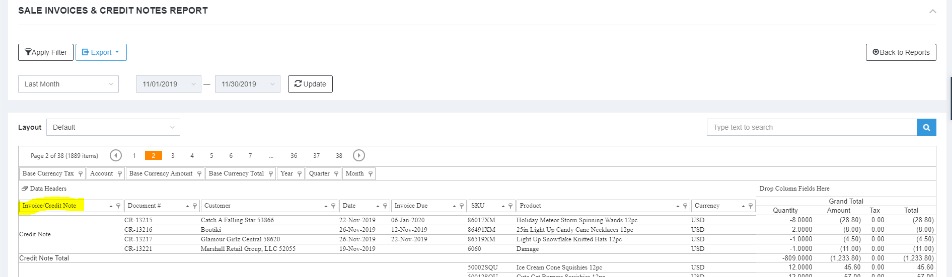
How can you total the credits for all the customers?
You can add the Invoice/Credit Note field in the first column to get total by Invoice and Credit Note separately.
Still no answer to your question? Please do not hesitate to get in touch with Cin7 Core support.