This article contains all the MailMerge tables for the CRM module. Each table contains MailMerge fields that can be used to edit CRM document templates. Please see Template editing for a video tutorial of the template editing process and familiarize yourself with how to Manage Document and Email Templates before editing your templates. CRM document templates can be downloaded from Settings → Document and email templates → CRM.
CRM MailMerge fields are used in the following template types: Task, Task List and Opportunity.
Note: Cin7 Core have a dedicated support team for resolving template issues, don't hesitate to contact Cin7 Core Support for help.
Before you start
- Manage Document and Email Templates (required) - please start here first if you are unfamiliar with how MailMerge fields work.
- Getting started with CRM (required).
Important table structure information
All sections in a template must be contained within TableStart and TableEnd tags. This defines which table the mail merge fields data will be pulled from.
- Templates will start and end with the parent TableStart and TableEnd tags, e.g. «TableStart:Purchase» and«TableEnd:Purchase». Child TableStart and TableEnd tags can be placed within the parent tags.
- Tables that may have multiple lines generated in them, for example, tables with sale order lines, purchase order lines, or additional Charges, will have TableStart and TableEnd tags within the table itself. e.g. «TableStart:POLines» and«TableEnd:POLines». These are child tags that will be found within the parent tags.
- TableStart and TableEnd tags that end in Details (POLineDetails, InvoiceDetails etc.) are for matrix documents, e.g. Purchase Order Matrix, Invoice Matrix.
If you need to customize standard templates, make sure that the opening tag for any table «TableStart:NAME» has the matching closing tag «TableEnd:NAME», or your template will not work. Try to change the structure as little as possible to preserve the template functionality.
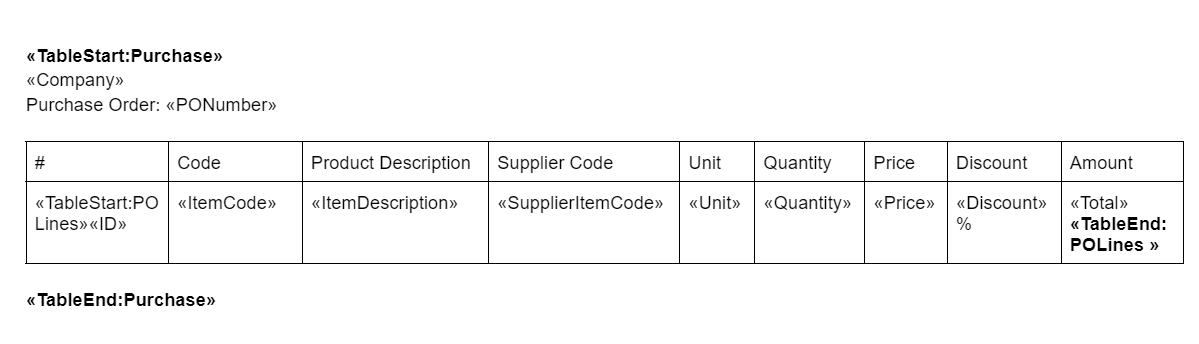
Parent table fields can be used in child tables but child table fields can only be used within the child table. In the sample table, Purchase is the parent table and POLines is the child table.
Sample Structure:
The most important thing to remember when making changes to templates is to change the FIELD CODE, not the FIELD NAME.
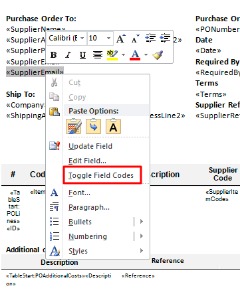
Right-click any <<field name>> and click Toggle Field Codes to show the field code (displayed as {MERGEFIELD field code}).
Windows users can toggle all field codes by holding down ALT + F9.
Mac users can toggle all field codes by pressing OPTION + F9.
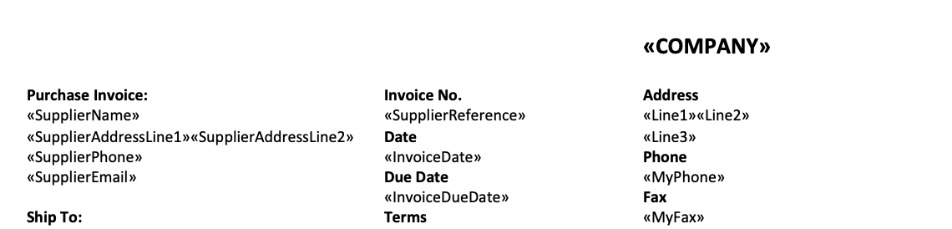
FIELD NAMES: Don't change these.
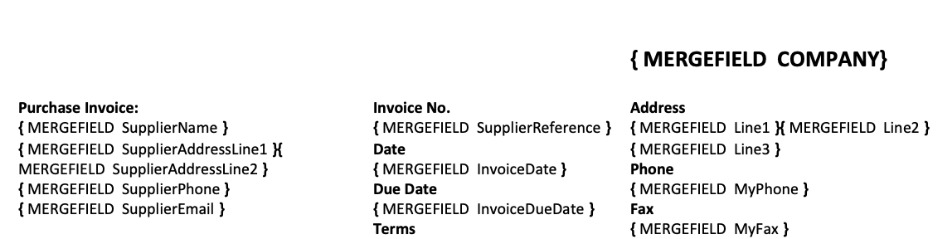
FIELD CODES: Change these.
Once you have made your changes to the field code, right-click and click Update Field for the changes to take effect.
CRM MailMerge fields
CRM MailMerge fields are used in the following template types: Task, Task List, Opportunity.
Tasks and Task Lists
The Task and Task List document templates are essentially the same, except Task List shows multiple tasks, whereas Task shows only one.
These field codes can be used between the «TableStart:Tenants» and «TableEnd:Tenants» tags. This is the parent MailMerge table for the task and task list templates. Parent fields can be used anywhere between the parent start and end tags.
| Field Code | Description |
|---|---|
| Company | Cin7 Core organization. |
| UserID | User ID who created the task/task list document. |
These field codes can be used between the «TableStart:Tasks» and «TableEnd:Tasks» tags.
| Field Code | Description |
|---|---|
| TaskID | Task ID number. |
| Name | Task name. |
| CreatedDate | Date task was created. |
| DueDate | Date task is due. |
| AssignedTo | User to carry out the task. |
| TaskStatus | Task status. |
| LinkTo | Reference to related entity (purchase order, sale invoice, etc.) |
| Details | Task description text. |
These field codes can be used between the «TableStart:TaskCategory» and «TableEnd:TaskCategory» tags. Task categories are optional for tasks.
| Field Code | Description |
|---|---|
| Name | Name of the task category. |
Opportunity
These field codes can be used between the «TableStart:Opportunity» and «TableEnd:Opportunity» tags. This is the parent MailMerge table for opportunity templates. Parent fields can be used anywhere between the parent start and end tags.
Opportunity field codes can be used in the Opportunity document template.
| Field Code | Description |
|---|---|
| OpportunityNumber | Unique Opportunity number |
| OpportunityDate | Date of Opportunity creation |
| Company | Company name |
| Line1 | Company Address Line1 |
| Line2 | Company Address Line2 |
| Line3 | Company Address Line3 |
| ShippingAddressLine1 | Full Shipping Address Part 1 (ShippingLine1 + Shipping Line2) |
| ShippingAddressLine2 | Shipping Address Part 2 (City, State, Post code) |
| BillingAddressLine1 | Full Billing Address Part 1 BillingLine1 + Billing Line2) |
| BillingAddressLine2 | Customer or Lead Billing Address Line2 |
| MyPhone | Company Phone |
| MyFax | Company Fax |
| MyEmail | Company Email |
| MyWebsite | Company Website |
| CustomerOrLeadName | Customer or Lead Name |
| CustomerEmail | Customer or Lead Email |
| CustomerWebsite | Customer or Lead Website |
| CustomerContact | Customer or Lead Contact |
| Terms | Payment terms |
| OpportunityMemo | Opportunity Memo. Additional information you would like to print on the opportunity. |
| Note | Internal note from the task header |
| ProductsBeforeTax | Products Amount Before Tax |
| ProductsTax | Products Tax (if applicable) |
| ProductsTotal | Total Products Total |
| AdditionalChargesBeforeTax | Order Additional Charges Before Tax |
| AdditionalChargesTax | Order Additional Charges Tax |
| AdditionalChargesTotal | Order Additional Charges Total |
| OpportunityBeforeTax | Opportunity Before Tax |
| OpportunityTax | Opportunity Tax |
| OpportunityTotal | Opportunity Total |
| DatePrinted | Date Printed |
| CustomerReference | Customer Reference |
Products
These field codes can be used between the «TableStart:Products» and «TableEnd:Products» tags. This is a child MailMerge table. Parent MailMerge table (Opportunity) fields can be used between child table start and end tags but child MailMerge table fields can only be used between the child table start and end tags.
Products TableStart tags, TableEnd tags and field codes are used to generate tables where opportunity product lines are displayed.
| Field Code | Description |
|---|---|
| ID | Line number |
| ProductCode | SKU |
| ProductName | Name of the product |
| Unit | Units sold |
| Quantity | Quantity sold |
| Price | Sale Price |
| Discount | Discount applied |
| Total | Line item Total |
| Comment | Line item Comments |
AdditionalCharges
These field codes can be used between the «TableStart:AdditionalCharges» and «TableEnd:AdditionalCharges» tags. This is a child MailMerge table. Parent MailMerge table (Opportunity) fields can be used between child table start and end tags but child MailMerge table fields can only be used between the child table start and end tags.
AdditionalCharges TableStart tags, TableEnd tags and field codes are used to generate tables where opportunity additional charges lines are displayed.
| Field Code | Description |
|---|---|
| ID | Line number |
| Description | Description of additional charges |
| Comment | Additional information for line item. |
| Amount | Unit Cost |
| Quantity | Quantity |
| Discount | Discount % |
| Tax | Tax |
| Total | Total for line item |