WMS Feature Request - Replenishment

The WMS is missing an important task for a warehouse, which is Replenishment.
Most warehouses will have “Pick” bins, that hold a small quantity of stock for fulfilling Sale Orders, with the excess stock placed into 'storage bins / pallets / storage shelving' etc (all stock is still located within the same single warehouse)
What needs to be added to Cin7 Core is a Replenishment function to ensure that:
- Our Pick Bins are topped up with stock when they become low
- Our Pick Bins contain enough units, to be able to fulfill outstanding Sale Orders
It could be like the existing function of WMS > Receive > Bin Transfer.
The difference with Replenishment is the first part - the Scan Out (Pick-to-Replenish) part.
- With Bin Transfer -> The user is manually deciding what SKUs to collect and transfer
- With Replenishment -> The user is provided a list of SKUs with their bin locations to collect and transfer (still following FIFO-Batch rules etc)
Requirements
1. Each SKU would need a field, where we can set a desired “Min Pick Bin Qty”
- A unit quantity is entered into this field, such as 0, 1, 2 etc.
- This is used as a data trigger for the replenishment rules
Potential Design
- On the web platform, there would be Inventory > Replenishment
- On the WMS, Replenishment would be on the main menu
- The system would auto-create a Replenishment Job, adding SKUs to a list that need to be transferred, using rules.
Rules
Add SKUs to a replenishment list, based on the following rules;
- (Min Levels) - Topping up of stock into Pick Bin locations
When any SKU’s quantity in the “Selected Pick Bin locations” or “Selected Pick Bin Groups” is;
- Equal to or less than, the SKUs “Min Pick Bin Qty” and
- Excess stock is available elsewhere
Example
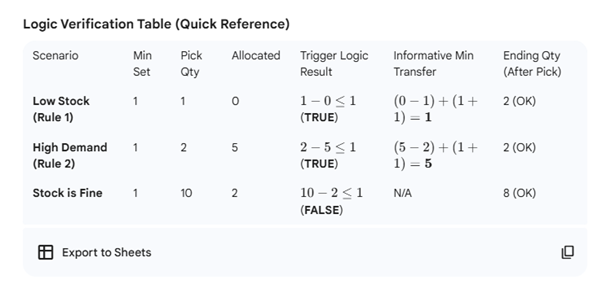
- SKU001 has a “Min Pick Bin Qty” quantity set as 1
- There are 2 units currently in this Pick Bin Quantity
- A sale order comes in and is picked, packed and shipped
- SKU001 pick bin quantity is now 1 and there is additional stock of SKU001 in other storage bin locations.
- This would cause the rule to trigger, and this SKU would be added onto the replenishment list.
- The WMS replenishment list would add this SKU to the Replenishment job list and advise the WMS user of the bin location to take from, following FIFO rules and Alpha-Numerical bin locations.
- The WMS would also “inform” the user of the minimum number of units required to transfer – to fulfill any current open sale orders and ensure that the pick bin ends up holding a greater number of units, than its Min Pick Bin Quantity.
- Note that the minimum units to transfer should only be informative. The WMS user must be able to transfer the quantity they choose to keep the platform flexible / cover various scenarios.
- In this example, if there was 0 allocated units remaining (meaning there are no sale orders outstanding for the SKU), and the SKU Pick Bin quantity is 1, then the informative Min Transfer quantity would be 1, which would result in the Pick Bin SKU containing 2 units (1 above its min setting)
- Min Transfer = (Allocated Qty - Pick Bin Qty) + (Min Pick Bin Qty + 1)
- Min Transfer = 0 - 1 + (1 +1) = 1
2. (Demand) - Ensuring Pick Bins have enough units to fulfil sale orders
When any SKU’s quantity in the “Selected Pick Bin locations” or “Selected Pick Bin Groups” have;
- Less unit quantities, compared to the “Allocated” quantity and
- Excess stock is available elsewhere
Example
- SKU001 has 5 units in the “Allocated” column
- SKU001 has 2 units in its “Pick Bin” location
- This means that the Pick Bin location is going to be short by 3 units, to complete the unfulfilled sale orders, so we need to transfer 3 units.
- If SKU Pick Bin quantity was set to 1, then after fulfilling those sale orders, we would be left with 0 units. Therefore, we’d really need to transfer an additional 2 units for a total of 5, to meet demand and to satisfy the min pick bin requirement.
- If there are additional units in the “Storage bin” locations, rule will trigger and the SKU would be added onto the replenishment list
- The WMS replenishment list would list the SKU to collect and its bin location, following FIFO Rules and Alpha-Numerical bin locations.
- The WMS would also “inform” the user of the minimum number of units required to transfer – to fulfill any current open sale orders and ensure that the pick bin ends up holding a greater number of units, than its Min Pick Bin Quantity.
- Note that the minimum units to transfer should only be informative. The WMS user must be able to transfer the quantity they choose to keep the platform flexible / cover various scenarios.
- In this example, if the SKU Pick Bin Min Quantity was set to 1, then it would inform the minimum units to transfer is 5 units
- Min Transfer = (Allocated Qty - Pick Bin Qty) + (Min Pick Bin Qty + 1)
- Min Transfer = (5 – 2) + (1 + 1 ) = 5
The Combined Logic for adding SKUs to the Replenishment List
A SKU is added to the replenishment list if;
- Excess stock exists in “Non Pick Bin" locations and/or "Main Warehouse”) AND
- (Pick Bin Qty - Allocated Qty), is less than or equal to, SKU Min Pick Bin Qty
Example from Point #2 (Demand)
- (2 – 5) ≤ 1 = True. SKU gets added to replenishment list
Main Benefit
Having a replenishment feature would be beneficial, because it would allow us to complete one replenishment task for all SKUs, at the very start of a morning, before being a pick run of Sale Orders. This saves time for the following tasks;
The Picking of Sale Orders
- Saves time by ensuring the Picker is always picking items for sale orders from the Pick Bin location and not having to go to storage locations / use forklifts etc.
The transferring of Stock
- Saves time by letting us transfer all SKUs in a single task
- The current process, we end up doing multiple transfers for each SKU as we’re picking sale orders
WMS User
WMS user would open the Replenishment function each morning as their first task. This will provide them with a list of individual SKUs to pick from storage bin locations and transfer into pick bin locations.
- The Bin Location of each SKU to collect from (whilst following fifo-batch rules and alpha-numerically bin locations)
- Inform WMS user of the minimum quantity to transfer to be able to fulfill all current sale orders in the system and ensuring that the Pick Bin will have a quantity above its set minimum once outstanding orders are completed/fulfilled.
- The WMS user can decide what quantity to transfer. We suggest letting the user decide as it allows flexibility
Note for Min Transfer Formula
Safety Logic Note: If the calculation for Min Transfer results in a number less than 0 (which can happen if a user manually tops up a bin just before the report is run), the WMS should display 0 as the informative quantity.
Summary
- Currently, picking orders is interrupted. This is because, when you schedule sales orders and start the PICK task, only to find there is not enough stock inside the “pick” bins, you need to either;
a) Exit the PICK task, go to the storage area/storage bins, transfer the stock from storage bin to pick bins, then go back into the PICK task.
b) Continue the PICK task, go to the storage area/storage bins as directed on the WMS, and pick the item from there. Later, you still need to transfer the stock to a ‘Pick’ bin.
Doing this on an individual SO / SKU is time consuming. For us, bulk storage is located downstairs and on pallet racking. Pick stock is upstairs.
Related to
Comments
3 comments
The option to pull off replenishment lists would be very useful instead of going round visually checking, if you could have a replen point for each locations similar to minimum before reorder and it told you where to pick based on costing method.
Correct Dawn, that's what we currently do - visually have to check each isle daily, to see which pick bins (starting with A) are empty. We then scan the product barcode (we've been attaching them to the pick bins), so that it allows us to at least use the stock lookup on the WMS, to know if there is more stock available in our flow locations (bins starting with F and P) following FIFO-Batch rules.
But this issue should be looked into, perhaps there's an even better way than I've suggested, hopefully the team at Cin7 considers this issue thoroughly.
This feature is an urgent requirement, we follow the exact same process (as do many other businesses), with pick locations and overflow stock elsewhere. Having a replenishment automation (as is available for between different “warehouses”) is vital, to speed process.
Please sign in to leave a comment.