'Required by' Date on WMS App

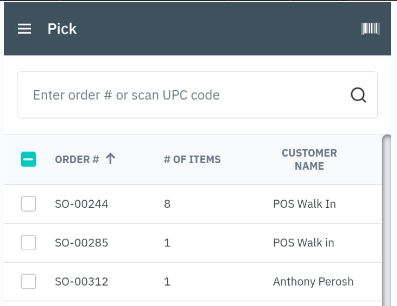
Please see below screenshot of the ‘Pick’ front screen on the WMS app. Is it possible to inset the ‘Required by’ date here, as an additional column? On the MES App it allows us to filter by “Today”, “Tomorrow” and “Overdue”. It would be equally handy to be able to filter picks by date, therefore allowing us to schedule picking further in advance, rather than having to do daily.
Comments
4 comments
This would be amazing!
Great idea!
Six months gone by since this was raised, I would have thought that this would be quite an easy fix? Would be great to know if this is being looked into. We are hitting peak season in our business and our operations team can only see what is in front of them each day and then having to print off paper to get a longer-term view. They then revert to paper and stop utilising the App. Not ideal in today's day and age. A date filter/calendar on the picking screen, on the WMS, would really be a simple yet beneficial addition. Pleeeeeease.
Agreed great idea. Lots of work needed on the WMS
Please sign in to leave a comment.