Feature Request - WMS Pick - FIFO-Batch item window - Flip the field positioning for tote and batch

Hi Team,
Hope all is well, another feature request (more just an improvement tbh)
- WMS - Pick
- FIFO-Batch Products
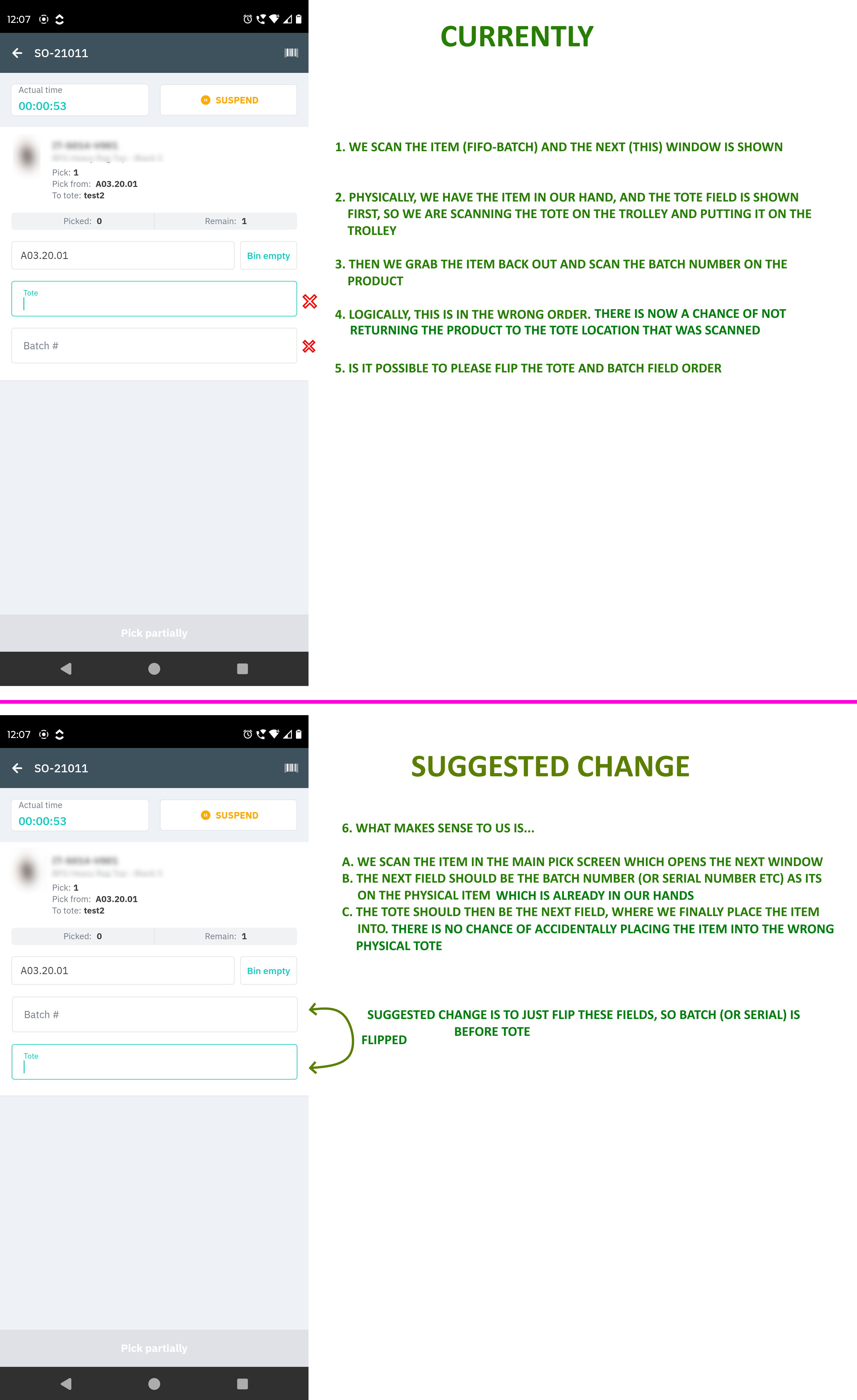
- On the second screen (the item window), we strongly feel that the fields for TOTE and BATCH are in the wrong order
Reasoning
- In the main Pick screen, we have walked to the bin location, collected the item, and have it in our hands.
- We scan the Product barcode, which opens up the next Item window
- Currently → The system wants us to scan the tote on the trolley, and then scan the batch. This is not really logical.
- Suggested Change → As the item is already in our hand, surely the next step would be to scan the batch number (or even Serial number if it was FIFO-Serial) as the item is already physically in our hands. Thereafter, the final step would be to scan a tote barcode and place the item into that tote.
- All that is required is a minor change. Flipping of the fields order, where Batch (and Serial) is BEFORE the TOTE field.
- It would streamline the process better and reduce the chances of placing the items in the wrong tote, as currently it is awkward scanning the product, then scanning a tote, then going back to the product to scan the batch, then going back to the tote to remember which one you scanned/remembering where to place it - see the problem?
Related to
Comments
5 comments
This is implemented and released.
Hi Anushree,
I've checked this, and can confirm it is not implemented.
The tote field is still before the batch field when picking more than 1x SO at a time.
App version 1.14.116
I believe this is not implemented, I've checked today :(
Let me check the App Version for this change and will get back to you soon.
Noted, we're running Android app version 1.14.116 (the latest one)
Please sign in to leave a comment.