Supplier Deposit Account - Multi-Account Option

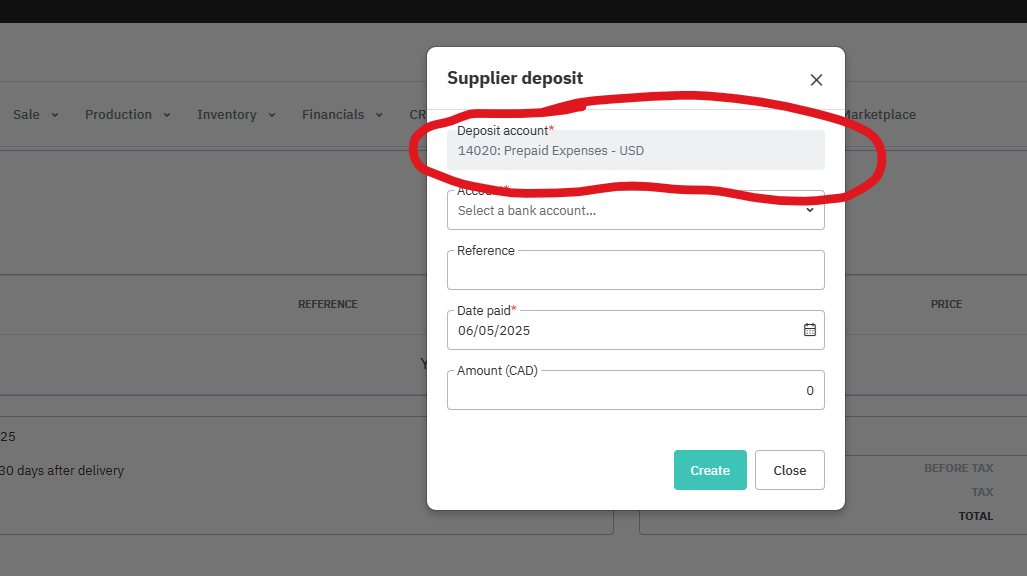
Cin7 Support confirmed that the Deposit account field in Core is system-controlled and locked by default. Core currently allows you to associate only one account at a time to record supplier deposits.
If you need to use different accounts (e.g., one for USD and another for CAD prepaid expenses), the only available method within Core is to manually update the Supplier Deposit account by navigating to Settings > Reference Books > Account Mapping each time you want to change the deposit account. Unfortunately, there’s no option to select the account per transaction.
They confirmed how limiting this can be, especially in a multi-currency setup.
As such, an option should exist for you to choose which deposit account you want to post your Supplier deposit to. In our case, USD, CAD, and GBP currencies are all tracked in their own accounts, so having them all in the same account makes reconciling very difficult. This should be an easy fix and option for Cin7 users.
Related to
Comments
0 comments
Please sign in to leave a comment.