Stop syncing SKU to Xero when syncing sale invoices

Ticket - https://cin7.zendesk.com/agent/tickets/272602
Organisation - Synxbody - AU and Synxbody - NZ 2
Customer needs to stop syncing SKU when syncing the sale invoices to Xero.
I have tested this in my test account and noted that when ever a sale invoice is syncing to Xero from Cin7 Core, the product sku is also getting synced and appearing in the sale invoice in Xero end. Please refer to the screenshot below.
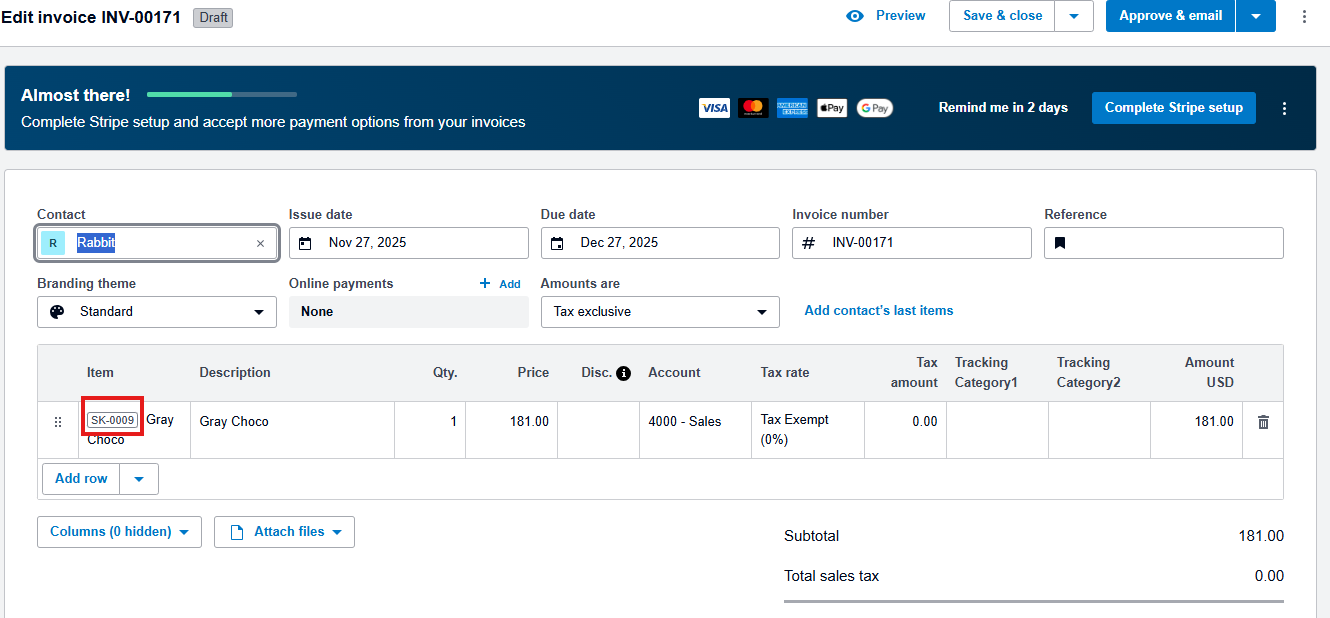
The customer needs to stop this from happening and they basically needs to sync only the description part.
Comments
6 comments
@Drift Hunters When using the Notify feature, you can send an email to only one recipient—the default email address listed on the customer record.
Sometimes integrations treat SKU and description as mandatory fields for mapping, so any option to just sync one might need developer or support involvement. It would be great if Cin7 added more flexible field mapping in the Core → Xero sync settings so users can decide exactly what gets pushed over.
@space waves
It sounds like you're trying to stop the SKU (item code) from appearing on invoices synced from Cin7 Core to Xero, but what you're seeing is actually expected behavior based on how the integration works, that item code is always sent when the invoice is pushed to Xero.
@geometry dash lite
Sometimes integrations interpret SKU and description as necessary fields for mapping, thus simply syncing one may require developer or support involvement.
@Geometry Dash
Thank you for your detailed testing. To stop SKU syncing to Xero invoices, disable the "Include SKU" option in your Cin7 Core Xero integration settings under sales invoice mapping. That should resolve it. Great catch!
@nyt midi
Some integrations treat both SKU and description as required mapping fields, so syncing even one of them may still need help from a developer or support team.
@카드깡
Please sign in to leave a comment.