Cin7 Core normally loads new/updated data to and from QuickBooks during the syncing process between Cin7 Core and the accounting application.
In case there's a need to overwrite data from QuickBooks, the QuickBooks Integration page in Cin7 Core features a Load Historical Data function which allows loading of historical changes/documents/transactions from QuickBooks to Cin7 Core, starting from a specified custom date which must not be more than 30 days before the current date. Transactions up to one month old can be loaded.
Before you start
- QuickBooks Online Integration - Basic
- Users will need the Integration: Accounting - QuickBooks permission in order to use this feature.
Load historical data from QuickBooks to Cin7 Core:
- In Cin7 Core, navigate to Integrations → QuickBooks integration.
- Click Sync History.
-
On the QuickBooks Synchronization page, click the Load historical transactions button. Transactions up to one month old can be loaded.
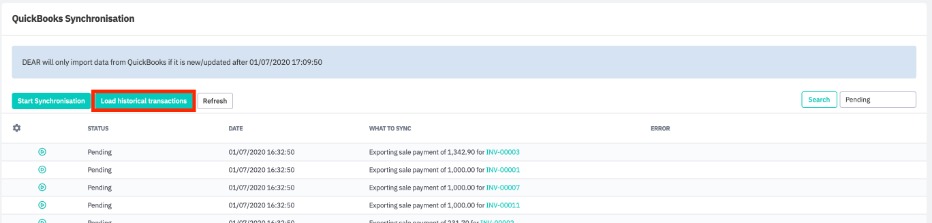
- Select the starting date for the changes to be imported from QuickBooks, then click Start Sync.
- Once the sync process is completed, all historical changes/documents/transactions from QuickBooks will be loaded into Cin7 Core.
- Publish to everyone.4.log-2010416261.zip30 KB
- Publish to everyone.4.log-2010416261.zip30 KB
- Publish to everyone.4.log-2010416261.zip30 KB
- Publish to everyone.4.log-2010416261.zip30 KB
- Publish to everyone.4.log-2010416261.zip30 KB
- Publish to everyone.4.log-2010416261.zip30 KB
- Publish to everyone.4.log-2010416261.zip30 KB